Debug mode
Your application validates a key, but nothing shows up on the license? The debug mode shows the API calls made to your products as they arrive, so you see what your application really sends, and what LicenseManager answers.
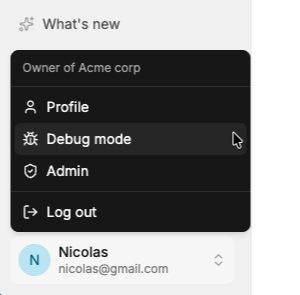
Open it from the menu under your profile picture, at the bottom of the sidebar, then Debug mode. While you go through Getting started, it’s also in the sidebar, and on the empty Machines, Validations and Analytics tabs of a license.
What it shows
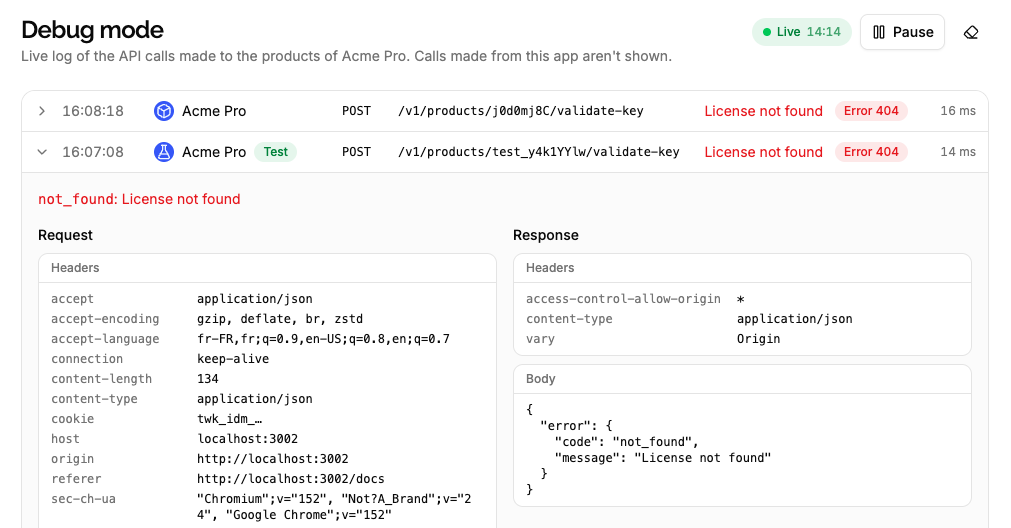
Each call shows:
- When it was received, and the product it was made to.
- Its method and path, like
POST /v1/products/x7Kp2QaZ/validate-key. - Its outcome: success, or the error, with its code and message.
- How long LicenseManager took to answer.
Click a call to see the request and response, with their headers and body.
The page shows the calls made with the id of one of your products, like key validations, and the calls made with your API keys or tokens. The calls made from the dashboard itself aren’t shown.
Only the start of API keys, tokens and cookies is shown in the headers. License keys and the other values of the bodies are shown as sent.
Live, for 15 minutes
The log is live: new calls appear within a few seconds, without reloading the page. Pause it to read a call without new ones coming in, and Resume to catch up on the calls received meanwhile.
It stops by itself after 15 minutes, so a forgotten tab doesn’t keep running: hit Play or refresh the page to start again.
The page shows the calls from the moment you open it, and the ones of the last few minutes. Calls aren’t kept: refreshing the page clears the log, and captured calls are deleted after an hour.
Nothing shows up?
When no call arrives, your application doesn’t reach any of your products. Check that:
- It calls the id of one of your products: the debug mode lists them when nothing arrives. A call to a product id that doesn’t exist answers
404and can’t be traced back to your organization, so it isn’t shown. - It calls the right product: test keys only exist in the test product, and live keys in the live one.
- It reaches LicenseManager’s API, at
https://api.licensemanager.dev, and not a typo of it or a local server. - The call is actually made: log it in your application, and check the device is online.
When calls show up but fail, the error tells you why: see Handling validation errors.