Events
An event records something that happened to a policy, a license or a machine: its creation, each change with the previous and new values, each validation of a key, successful or not, and each deactivation. Each event tells when it happened and who did it.
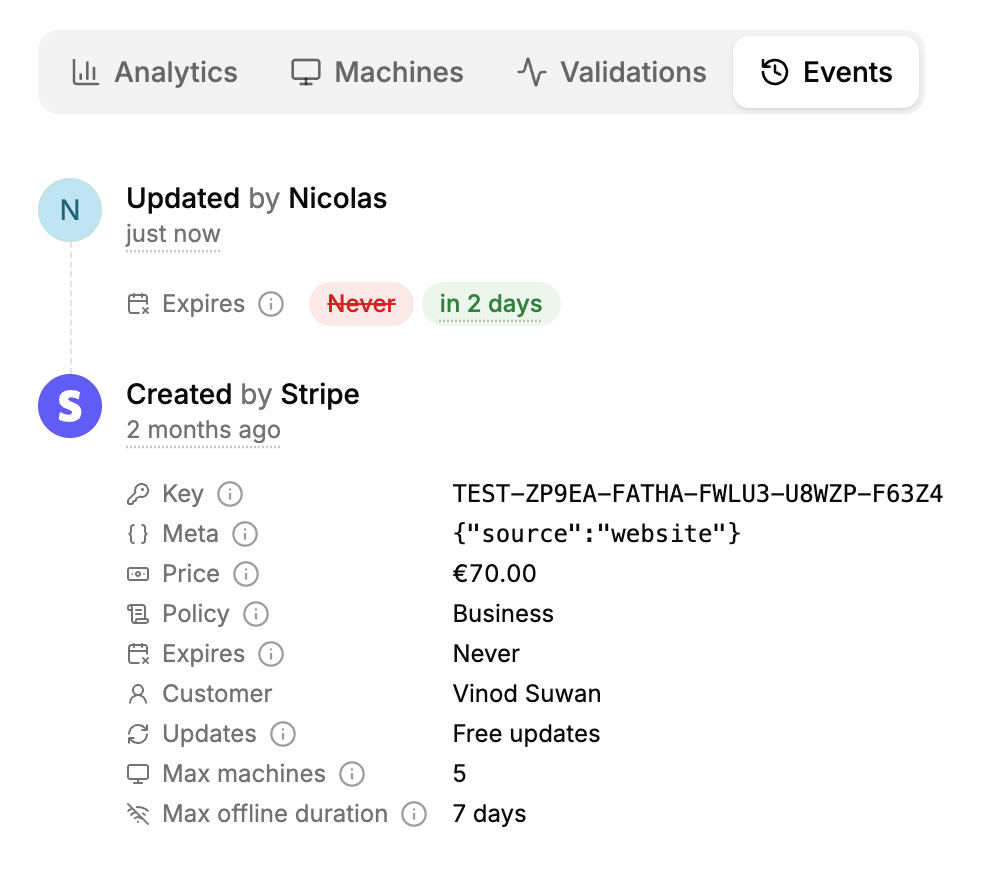
Where to find them
- On a license: the Events tab shows its whole history, and the Validations tab only its validations, with the reason of each failure.
- On a policy: its creation and changes, in the policy’s panel.
- Through the API: list the events of a policy or a license, filtered by type, or by machine for a license. These endpoints accept API keys, not scoped tokens.
Event types
| Type | Shown as | Recorded when | Details |
|---|---|---|---|
policy.created | Created | A policy is created, including the default policy of a new product, and the policies copied into a test product. | The policy’s settings. |
policy.updated | Updated | A policy’s settings change. | Each changed setting, with its previous and new value. |
license.created | Created | A license is created. | Its key, policy, customer and settings. |
license.updated | Updated | A license’s settings change, including when a version lock is applied. | Each changed setting, with its previous and new value. |
license.validated | Validated | A machine validates the key successfully. | The machine’s fingerprint, name and version, and whether the validation created the machine (New machine) or activated it again (Machine activated). |
license.validation_failed | Validation failed | Validating the key fails, except for keys that don’t exist. | The error, like license_expired, the fingerprint, name, platform and version sent, and, for version_not_allowed, the latest allowed version. |
machine.deactivated | Deactivated | A machine is deactivated. | The machine’s fingerprint and name. |
Who did it
Each event shows who caused it, under By:
| Shown as | Who |
|---|---|
| A member’s name | A member of your organization, in the app. |
| An API key’s name | Your backend, with an API key. A deleted key shows as Deleted API key. |
| Customer token, License token or Machine token | A scoped token, like a customer deactivating a machine from the customer portal. |
| Automation | LicenseManager itself, like applying version locks every hour. |
| Stripe | The Stripe integration, like the licenses a payment creates. |
| Public | A request without authentication: the validations of license keys by your application. |
What isn’t recorded
- Changes that change nothing. Saving a license without changing anything records no event.
- Deletions. Deleting a policy, a license or anything else records no event, and the events of a deleted policy or license can no longer be listed. To keep a license’s history, expire it rather than deleting it.
- Customers, products and releases have no events. The creation of a customer shows in the
license.createdevent of its first license. - Validations of keys that don’t exist: there’s no license to attach them to.
- Requests that read data, like listing licenses.
Use cases
Support: “my key doesn’t work”. Open the license’s Validations tab: each failure tells why, like machine_limit_reached from a new laptop, or version_not_allowed with the version they tried.
Audit: “who extended this license?” The license’s license.updated events show each change of its expiration, with the member or API key that made it.
Spotting shared keys. A license validated from many fingerprints shows many New machine validations, and refused ones once its limit is reached.
Understanding a version lock. The license.updated event by Automation shows the version hard-coded when the lock was reached.
Edge cases
A license’s events don’t include its policy’s changes. license.created isn’t listed in its policy’s events, and changing a policy doesn’t change its licenses, so it records nothing on them. See policies and licenses.
Changing the default policy records a policy.updated event on both policies: the new default, and the previous one.
Renamed and deleted machines. Events show a machine with its current name. A machine deleted with its license shows only what the event recorded.
Test products. Events of test products are deleted when the test product is reset or deleted.