Portal links
A portal link signs a customer in to the customer portal directly: no email to enter, no sign-in email to wait for. You create it for one customer, with how long it works, and send it to them, or open it from your own website.
It’s like the link of a shared document that opens it without an account: convenient, but anyone holding the link gets in, until it expires.
Create a link
Open the customer
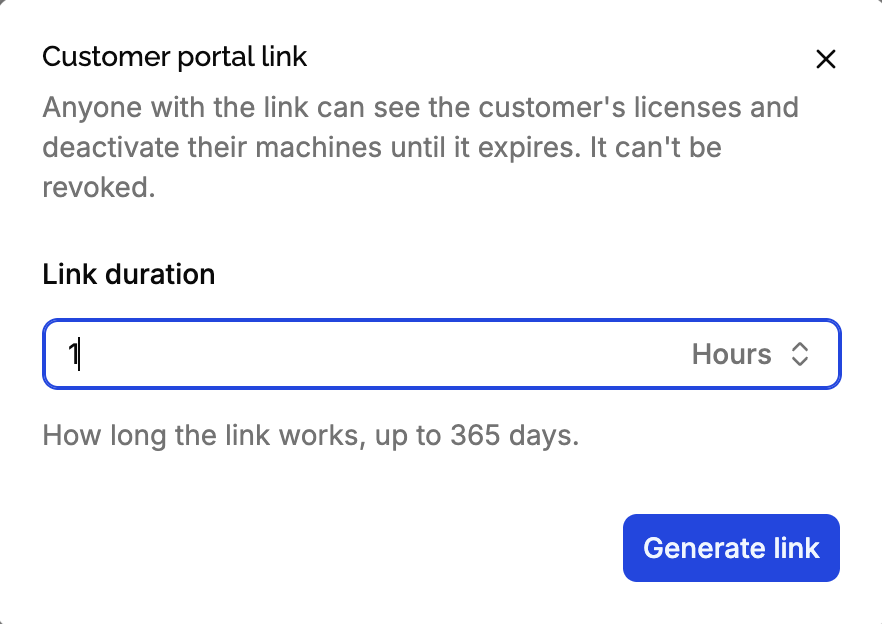
In the product’s Customers, click ⋯ on the customer, then Generate portal link. From a license’s page, click Portal link at the top: the link is for the license’s customer.
Choose how long it works
From 5 minutes to 365 days, 1 hour by default. Keep it short: the link can’t be revoked.
Share it
Copy it, open it to see what the customer sees, or click Send to customer to email it to them. The email tells them how long the link works.
Anyone with the link can see the customer’s license keys and deactivate their machines, until it expires. It can’t be revoked: it only stops working when it expires, or when the customer is deleted. Only send it to the customer’s own email, and keep durations short.
What a link can do
A link holds a customer token, scoped to the customer: see scoped tokens. It allows exactly what the portal does:
- See the customer and their licenses of this product.
- See their machines, and deactivate them.
It can’t change licenses or reach other customers, even of the same product. It can create narrower tokens for the customer’s licenses and machines, with at most its own permissions and expiration: see tokens creating tokens.
From your website
When customers already have an account on your website, a Manage my licenses button can open the portal signed in, without asking for their email again. Your backend creates a short link and redirects to it:
Find the customer
With an API key, on your server, find the customer of the product by email:
curl "https://api.licensemanager.dev/v1/products/x7Kp2QaZ/customers?email=jane@example.com" \
  -H "x-api-key: $API_KEY"
Create a link
Create a link that works for a few minutes, enough to open it:
curl -X POST https://api.licensemanager.dev/v1/customers/c9Wd3RtE/portal-links \
  -H "x-api-key: $API_KEY" \
  -H "Content-Type: application/json" \
  -d '{ "expiresInSeconds": 300 }'
{
"url": "https://app.licensemanager.devportal/x7Kp2QaZ?token=eyJhbGciOi…",
"token": "eyJhbGciOi…",
"expiresAt": "2026-10-14T10:05:00.000Z"
}Redirect to it
Redirect the customer to the url. Add &return_url= with a page of your website to show a return link to it, if its domain is allowed.
The customer stays signed in until the link expires, so a 5 minute link gives a 5 minute session. Create a longer one, like 1 hour, if your customers spend time in the portal.
To email a link you created through the API, send its token to POST /v1/customers/{id}/portal-links/send.
How long a customer stays signed in
As long as the link works. The portal keeps the token for the browser tab, without it in the address bar, so reloading the page keeps the customer signed in, and copying the address doesn’t share the session. Closing the tab, or clicking Sign out, signs them out. Once the link has expired, the portal asks for their email to send a new one.
Edge cases
The portal is disabled. You can create links, but they show a Page not found until you enable the portal, and Send to customer is refused with portal_disabled.
Test products. Send to customer only works when the customer’s email is a member’s of your organization: see emails in test mode. You can still copy and open the link.
The customer’s email changes. Links already created keep working: they’re tied to the customer, not the email. Send to customer sends them to the new email.
The customer is deleted, or the test product is reset: their links stop working.
A link of another product’s customer. Opening it on another product’s portal signs out right away.
Who did it. Machines deactivated through a link are recorded as machine.deactivated events by Customer token.