Offline validation
Each successful validation returns a license token: a JWT signed with your organization’s private key. Your application stores it and verifies it locally with the matching public key, so it starts and runs without reaching LicenseManager. Nobody can forge a token without the private key, which never leaves LicenseManager.
It’s like a boarding pass: the gate agent checks it’s genuine and for this flight without calling the airline. It’s only valid for one flight, and a new trip needs a new pass.
The public key
Open Security in the sidebar: it shows your organization’s public key, its algorithm and its id. Embed the key in your application, as a constant.
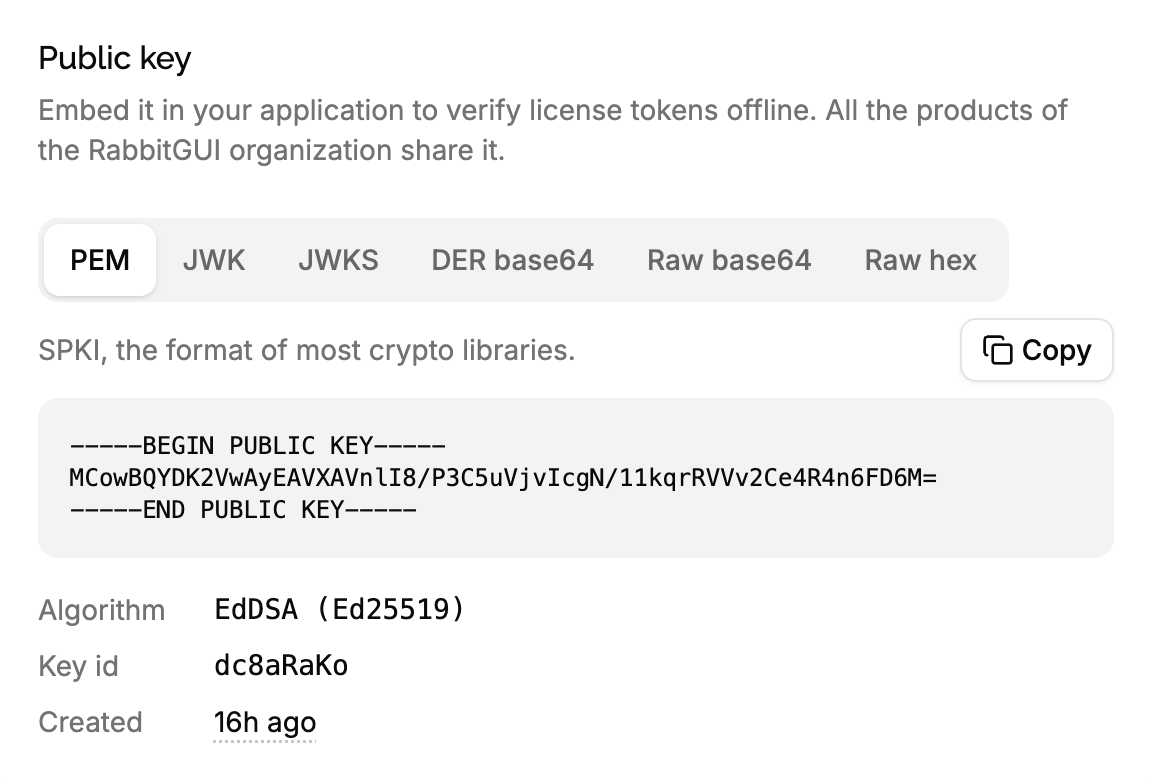
- The key is public: it can only verify tokens, not create them. Shipping it in your application is safe.
- There’s one key per organization, signing the tokens of all its products, test products included. That’s why you must check the audience.
- The key is created the first time it’s needed and never rotated: what you embed today keeps working.
- Through the API,
GET /v1/signing-keyreturns it, with an API key.
Hard-code the public key in your source code. Don’t load it from a file next to your application, and never fetch it from the API at runtime.
Whoever controls the key controls which tokens your application accepts. A file can be swapped in seconds with a key of their own, and a request to the API can be redirected to a fake server: either way, someone can sign their own tokens and your application trusts them. A key compiled into your code can only be replaced by modifying the application itself, which is much harder to do.
The token
The token is a JWT signed with Ed25519 (alg: EdDSA). Its header holds the id of the key in kid, and its claims are:
| Claim | Value | What to check |
|---|---|---|
aud | The product’s id, like x7Kp2QaZ. | Make sure it is equal to your product ID, the product ID should be hard coded in your source code. |
sub | The license key. | Equal to the key your application stored. |
fp | The machine’s fingerprint. | Equal to the fingerprint of the device it runs on, so a token copied to another computer doesn’t work. |
exp | When the token expires: the license’s max offline duration after it was issued, or when the license expires if that’s sooner. | Most JWT libraries do it for you. |
nbf | Two hours before iat, so devices whose clock is a bit behind accept a fresh token. But users who change their clock in the past fail. | Most JWT libraries do it for you. |
iat | When the token was issued. | |
mv | The license’s hard-coded version, like "2.3", "2", or null when it allows every version. | Make sure the current version of the app is equal or smaller: see checking versions. |
iss | Your organization’s name. | No, do not check it: it changes when the organization is renamed. |
Verify the token
On launch, read the stored token
No token means the application isn’t activated: ask for a key.
Verify its signature and claims
With the public key, accept only EdDSA, and check aud, sub, fp and exp:
import { importSPKI, jwtVerify } from "jose";

const PUBLIC_KEY = `-----BEGIN PUBLIC KEY-----
MCowBQYDK2VwAyEA…
-----END PUBLIC KEY-----`;
const PRODUCT_ID = "x7Kp2QaZ";

async function verifyLicense(token: string, key: string, fingerprint: string) {
  const publicKey = await importSPKI(PUBLIC_KEY, "EdDSA");
  const { payload } = await jwtVerify(token, publicKey, {
    algorithms: ["EdDSA"],
    audience: PRODUCT_ID,
    subject: key,
  });
  if (payload.fp !== fingerprint) throw new Error("Token of another machine");
  return payload;
}
Renew it before it expires
When the token is valid but gets close to its exp, validate the key again in the background, and replace the stored token. When the device is offline, keep using the current one.
Lock the application once it expires
An expired token, or one that fails verification, means the application must validate the key again before unlocking itself. Show why when validation fails: see handling validation errors.
Check aud. Without it, a key of your test product, which anyone in your team can create, would unlock your production application: its tokens are signed with the same key.
How long a token lasts
The token lasts the max offline duration of the license, at least 1 hour, but never longer than the license: a license expiring on March 3 gives tokens that expire on March 3 at the latest, whatever its max offline duration.
| License | Max offline duration | Token issued on March 1 expires |
|---|---|---|
| Never expires | 1 week | March 8 |
| Expires March 3 | 1 week | March 3 |
| Expires next year | 1 hour | March 1, one hour later |
What a token doesn’t know
A token is a snapshot of the license when it was issued. Changes made afterwards only reach the application at its next validation:
- Extending a license doesn’t extend the tokens already issued: the application gets the new date at its next validation.
- Expiring a license, deactivating a machine or lowering the max offline duration doesn’t revoke the tokens already issued: the application keeps running until its token expires, at most the max offline duration later.
- Deleting a license doesn’t either.
So the max offline duration is also how long a change takes, at most, to reach every device. Choose it with that in mind: see max offline duration.
Checking versions offline
mv holds the license’s hard-coded version: "2" allows every 2.x.x version and older, "2.3" every 2.3.x version and older, null every version. Before installing an update, compare its major and minor numbers with mv, to avoid downloading a version the license doesn’t include.
A license with time-limited updates has mv: null until its lock date is reached, so a token issued before the lock doesn’t know about it. The validation of the new version tells you for sure.
Edge cases
The device’s clock is wrong. A clock behind by up to two hours accepts fresh tokens, thanks to nbf. A clock far ahead makes tokens look expired: validating the key again gives a new one, which looks expired too. Tell the customer to check their clock when a token is expired right after it was issued.
A customer sets their clock back to keep using an expired token. Offline, the application can only trust its clock. If it matters to you, store the latest time your application has seen, and refuse to start when the clock goes back before it.
Renaming your organization changes iss in new tokens. Applications that check iss would refuse them: check aud instead.
Several products in one application, like an app with a paid plugin. Each product has its own id: verify each token with the aud of the product it’s for.