Usage
Usage stats tell how many of your licenses are actually used, on how many machines, and how that changes over time. They’re on the product’s Dashboard, and, for a single license, in its Analytics tab.
The dashboard
The top of the dashboard shows eight stat tiles, then the New licenses and Activations by version charts.
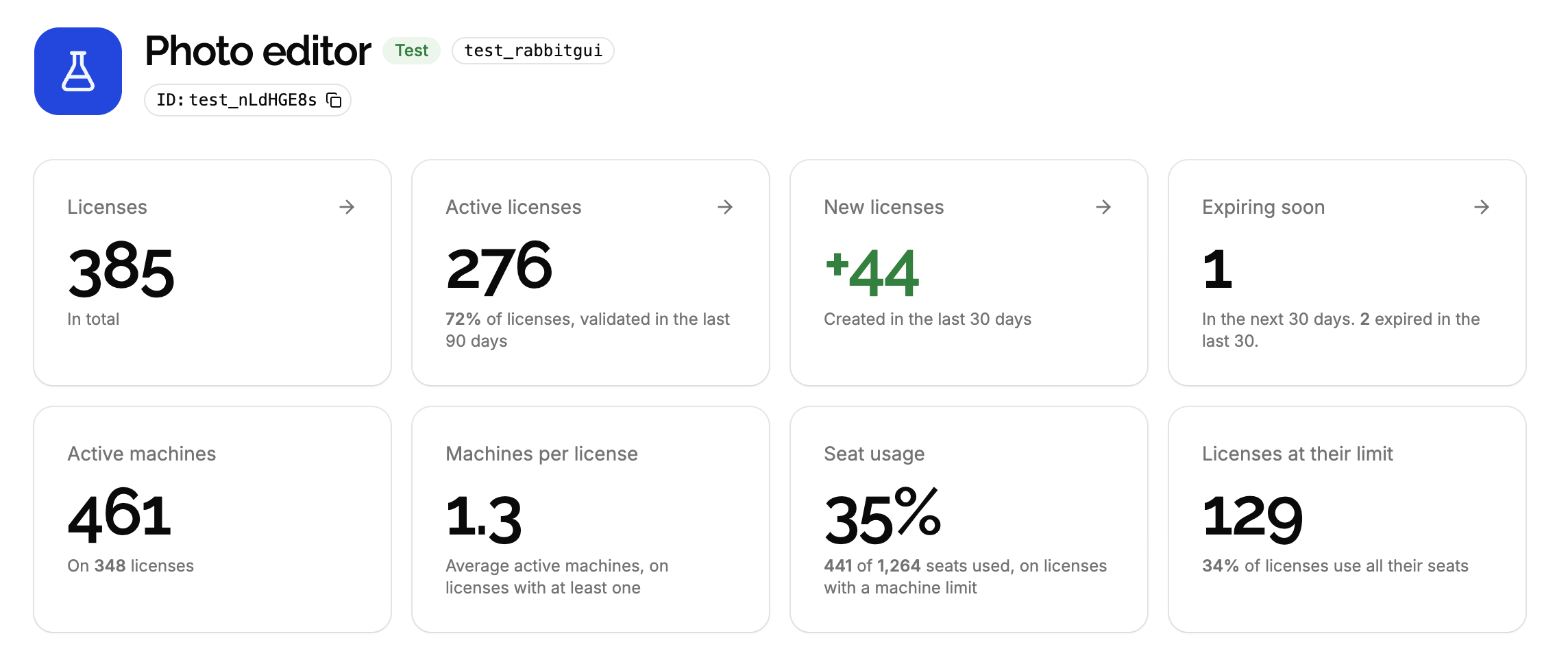
Licenses
| Tile | What it counts |
|---|---|
| Licenses | Every license of the product, expired ones included. |
| Active licenses | Licenses that haven’t expired and that a machine validated in the last 90 days, with their share of all licenses. These are the licenses that count toward the limit of your plan. |
| New licenses | Licenses created in the last 30 days, today included. |
| Expiring soon | Licenses expiring in the next 30 days. The hint below tells how many expired in the last 30 days. |
Click a tile to list the licenses it counts. Expiring soon is the one to check regularly: it lists the customers to remind about a renewal.
Machines and seats
| Tile | What it counts |
|---|---|
| Active machines | Machines that haven’t been deactivated, on every license, and the number of licenses they’re on. |
| Machines per license | Average number of active machines on the licenses that have at least one. Licenses never used don’t lower it. |
| Seat usage | Share of the seats used, on the licenses with a max machines that haven’t expired. A license with a max of 3 has 3 seats. |
| Licenses at their limit | Licenses with a max machines that are active on all their seats, with their share of all licenses. |
For Seat usage, each license counts at most its max machines as used: a license with 3 active machines and a max of 2, after its max was lowered, counts 2 of 2 seats, not 3. Licenses without a max machines are left out, so a product with only unlimited licenses shows No license with a machine limit.
Reading the seat stats. A high Seat usage and many Licenses at their limit mean customers use what they bought: they’re the ones who may need more seats. A low Machines per license on a policy allowing 3 machines means most customers use one.
New licenses
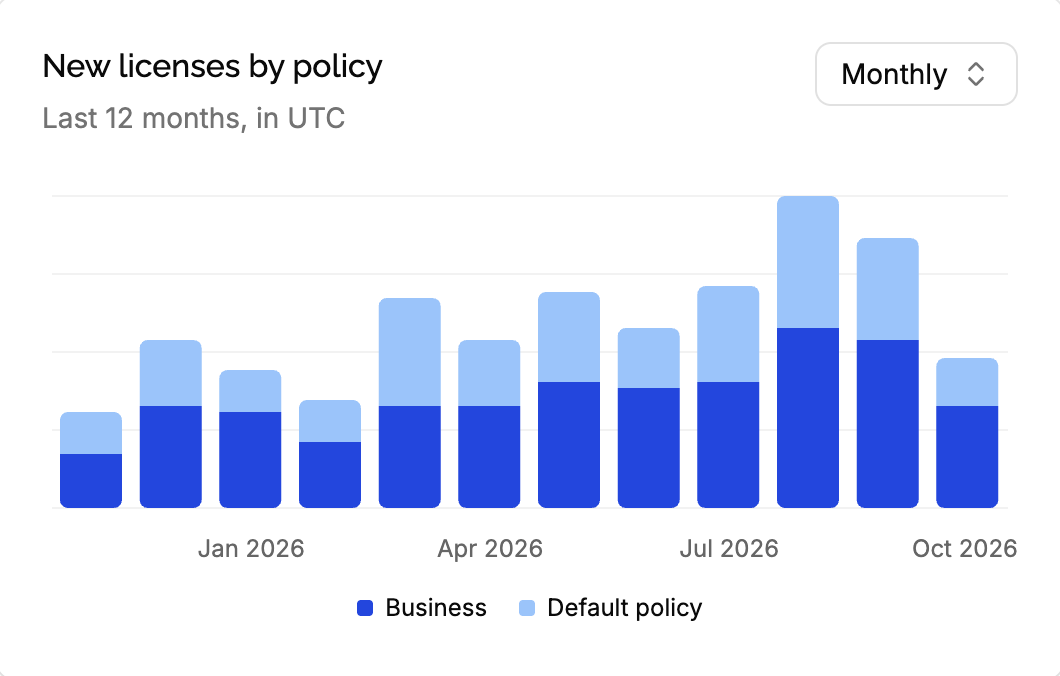
Licenses created each day over the last 30 days, or each month over the last 12 months: switch with the Daily / Monthly selector. When the product has several policies, each bar is split by policy, with a legend, and the chart is named New licenses by policy.
Every license counts, whatever created it: the app, the API, or a Stripe payment. Licenses deleted since aren’t counted.
Activations by version
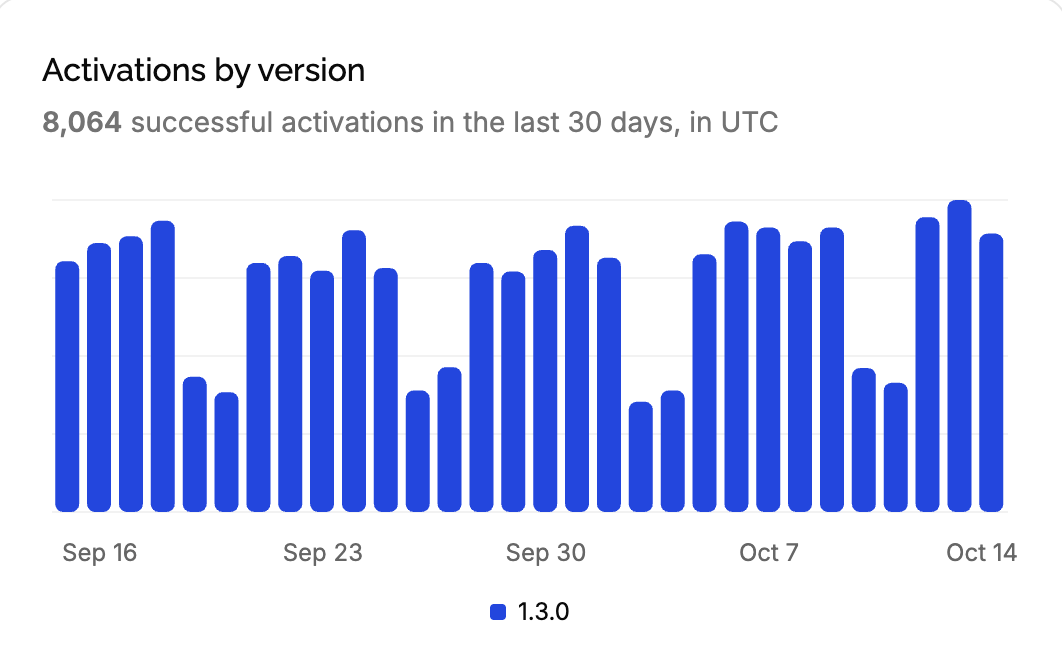
Successful activations each day over the last 30 days, each bar split by the version of your application. It tells how much your application is used, day after day, and which versions it runs. See release adoption.
The Analytics tab of a license
Opening a license shows its Analytics tab first: a chart of its successful activations each day over the last 90 days, with the total below.
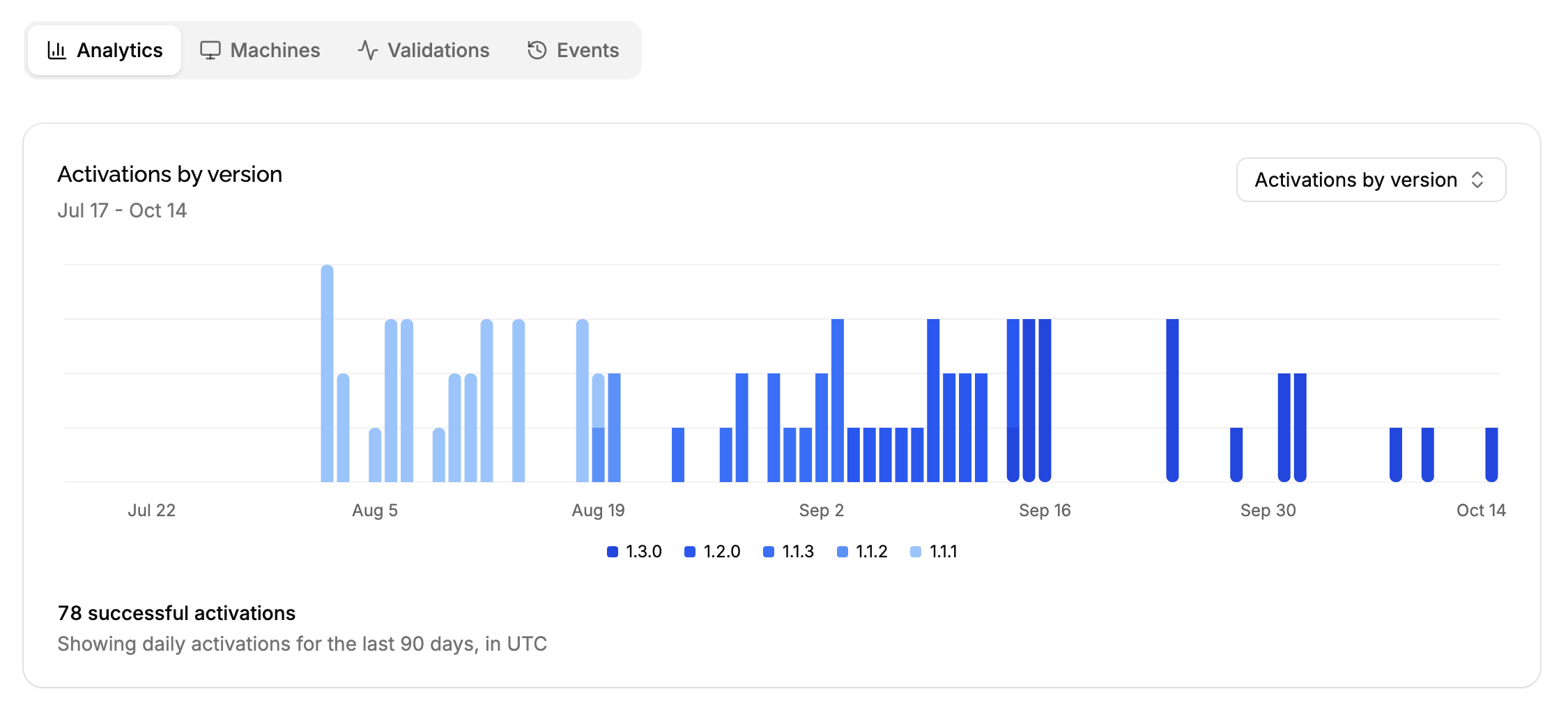
Pick what the bars are split by in the selector:
- Activations by version, the default: one color per version of your application. See release adoption.
- Activations by machine: one color per machine, shown by its name, or its fingerprint when it has none, from the one with the most activations.
Use it to answer a customer, or to spot unusual use:
- A license never activated, or not for weeks: the customer may need help installing your application.
- One machine with many more activations than the others, or many machines activating in turn: the key may be shared. Check the Validations tab for refused machines, and see spotting shared keys.
- A machine stuck on an old version while the others updated.
What’s left out
- Activations of deleted machines only count in Activations by version.
- Activations recorded without a version, if any, only count in Activations by machine.
The total below the chart counts every activation sent with a version.
Edge cases
Activations aren’t machines. An application validating its key every time it starts shows many activations per day for a single machine. Compare days with each other, not with the number of machines.
Offline validations. An application validating its license token without going online doesn’t reach LicenseManager: those uses don’t appear in the charts.
Deactivated machines. They leave Active machines and the seat stats right away, but their past activations stay in the charts.
Expired licenses. They’re still counted in Licenses, and their machines in Active machines until deactivated, but they’re never Active licenses.