Platforms
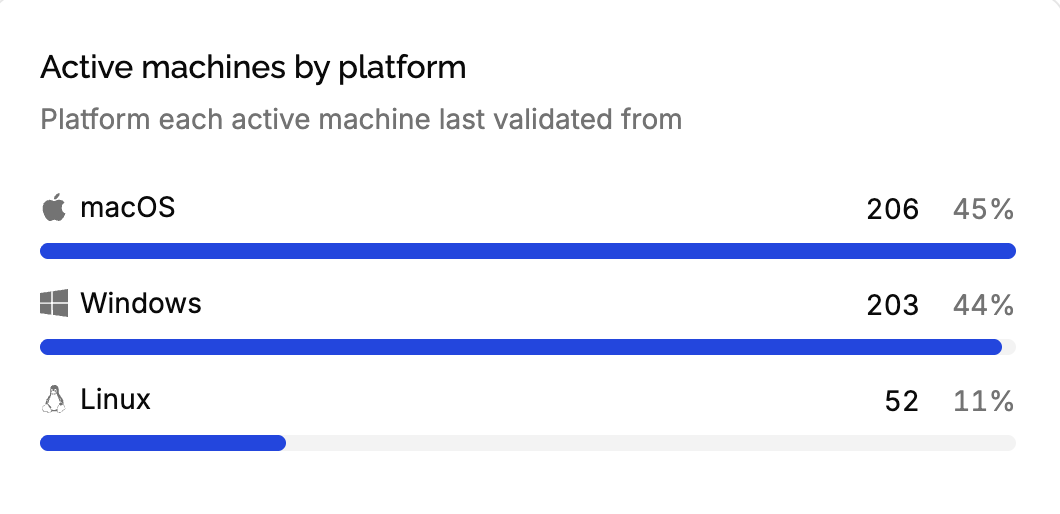
The Active machines by platform card of the product’s Dashboard tells which operating systems your customers use: how many run your application on macOS, on Windows, on Linux. Use it to decide which platforms to support, test and build first.
Where platforms come from
When your application validates a key, it can send the machine’s platform, like macOS or Windows 11. The machine keeps the last platform it sent. Sent once, it can’t be cleared: leaving it out of a validation keeps the current one. Nothing is detected: without a platform in the validation, the machine’s platform is unknown. See validating keys.
{
  "key": "7KQ2M-X9ZPA-H4TRC-WN6EY-B3JDF",
  "fingerprint": "4c32758f9a1e…",
  "version": "2.3.1",
  "platform": "macOS"
}
The card
Each platform is listed with its number of active machines and its share of all active machines, from the one with the most machines. The first 7 platforms are listed, the rest grouped in one others row. Machines that never sent a platform are listed as Unknown.
Only active machines count: deactivated ones leave the card right away, and each active machine counts once, on the last platform it sent, however often it validates.
Platform names
Platforms are counted exactly as sent: macOS, macOS 15.1 and Darwin are three rows. Choose how detailed you want the card to be, and send the same value from every build:
- The operating system only, like
macOS,WindowsorLinux, for a card with a few rows. - The operating system and its version, like
macOS 15orWindows 11, to know which versions to keep supporting. Send the major version only:macOS 15.1.1andmacOS 15.2would be two rows.
A logo is shown next to platforms recognized as macOS, Windows or Linux, from words like mac, darwin, win or ubuntu in the name. The logo doesn’t group rows: macOS and Darwin both get the Apple logo, on two rows.
The platform is also what your customers see in the customer portal to recognize their machines, along with its name: keep it readable.
Edge cases
Changing what you send. A machine moves to its new platform on its next validation. Until all your customers have updated, the old and the new names both appear.
A machine that changes platform, like a customer upgrading from Windows 10 to Windows 11 with the same fingerprint, moves to the new platform on its next validation.
Platforms of a single license. Open the license’s Machines tab: each machine shows its platform.