 LicenseManager
Sell your desktop app. We handle the license keys.
Connect Stripe or Paddle, and every purchase or subscription creates a license key and emails it to your customer. Your Electron, Tauri or Mac app checks it with our SDK, online or offline. No server to build, no webhook to host, and no cut of your sales.
Free up to 100 active licenses. No credit card required.
How it works
Three steps, no backend
Most of the setup happens in the dashboard. The only code you write is in your app.
- 1
Choose licensing model
Create a product and choose your offers: duration of licenses, are updates included, maximum number of machines...
- 2
Plug Stripe or Paddle
Customers pay once or subscribe on your own Stripe or Paddle account, with their checkout, and we create the license and send them the key by email.
- 3
Validate the key in your app
One HTTPS request, with no secret to ship in your app. It returns a signed token your app verifies offline on every launch.
The only code you write
Create a LicenseManager, register the Tauri plugin, or add the Swift package, pass it the key your customer enters, and unlock your app when the state is ACTIVE. The SDK does everything else.
- Persists the key in the keychain
- Validates offline on a signed token
- Detects clock tampering
- Locks the license to the machine
- Survives reinstalls
- Renews in the background
import { LicenseManager } from "@licenseman/electron";

const license = new LicenseManager({
  productId: "x7Kp2QaZ",
  publicKey: PUBLIC_KEY,
});

license.onStateChange((state) => updateUi(state));

// "ACTIVE", "MISSING_KEY", "EXPIRED"…
const state = await license.ready();

// When the customer enters their key
await license.setLicenseKey("7KQ2M-X9ZPA-H4TRC-WN6EY-B3JDF");// src-tauri/src/lib.rs
tauri::Builder::default()
.plugin(Builder::new("x7Kp2QaZ", PUBLIC_KEY).build())
// In your webview
await watchLicense(({ state }) => render(state));
await setLicenseKey("7KQ2M-X9ZPA-H4TRC-WN6EY-B3JDF");// MyApp.swift
let licenseManager = try LicenseManager(
productID: "x7Kp2QaZ", publicKey: PUBLIC_KEY
)
// In SwiftUI
@StateObject var license = LicenseObserver(manager: licenseManager)
if license.state == .active { ContentView() } else { ActivationView() }
try await license.activate(key: "7KQ2M-X9ZPA-H4TRC-WN6EY-B3JDF")Not on Electron, Tauri or macOS? Use one of our API SDKs, or call the API directly.
Features
Everything that happens after the sale
Keep selling with Stripe or Paddle. LicenseManager takes care of the keys, the machines, the updates and the support requests that come with them.
A license key for every Stripe or Paddle sale, without a webhook
When a customer pays a price you mapped, LicenseManager creates their license and emails them the key. Buying 5 seats gives 5 keys. Subscribing monthly or yearly gives a license that renews with every payment and expires when they stop paying. Payments, taxes and invoices stay in Stripe or Paddle, your merchant of record if you want one: we never touch your money, except to refund the licenses customers cancel, if you let us.
Lost keys, new laptops, refunds and expired cards, handled
Every product comes with a customer portal. Customers sign in with their email to copy their key, free a machine for their new computer, cancel during your money back guarantee and get refunded through Stripe or Paddle, or manage their subscription in the Stripe or Paddle customer portal, without writing to you.
Track usage, platforms, versions, revenue and MRR
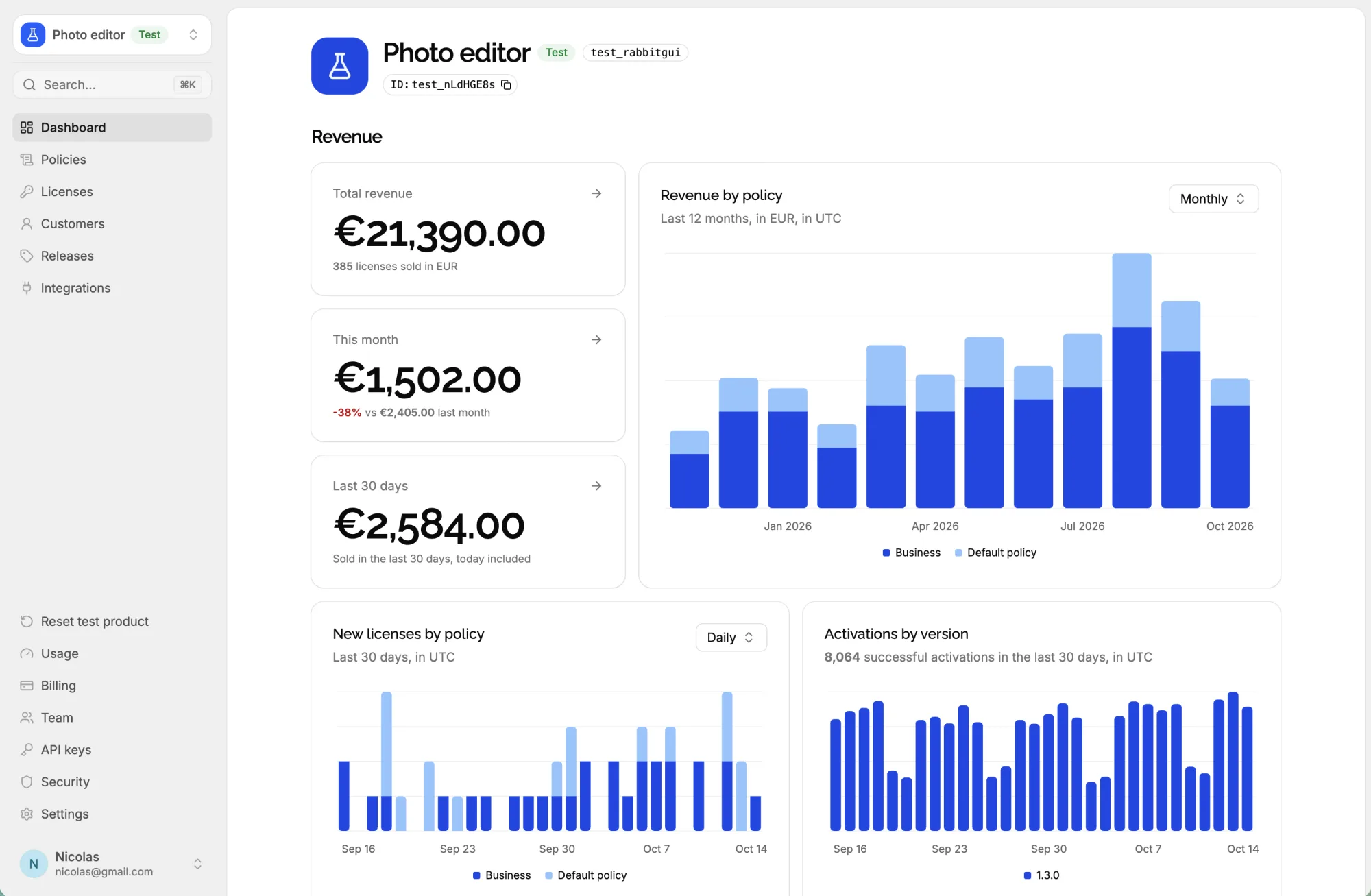
Active licenses and machines, adoption of each release, platforms, revenue per offer, and your MRR, churn and failed renewals. Built from the data you already have: nothing to set up.
No backend needed
Stripe or Paddle talks to LicenseManager, and your app talks to LicenseManager. No server of yours in between, no webhook to host, no database of keys to keep.
Your users can work offline
Your app verifies a signed token locally, and only reaches LicenseManager when it nears its expiry. You choose how long: an hour, a week, or months.
Test mode for development
Test products have their own keys, use Stripe in test mode or a Paddle sandbox, and never email your real customers. Break things freely.
An audit log for every change
Every license change and refused validation is recorded, with who did it and why, so support questions take a minute.
A full REST API
Everything in the dashboard is in the API too, to create licenses from your own checkout or import existing ones.
Built for teams
Invite your team as owners, admins or members, with two-factor authentication. Support can help customers without your keys.
License models
Sell it the way you want
Each offer sets how long a license lasts, on how many machines, and which versions it unlocks. Combine them to match your pricing page.
Perpetual
Pay once, use forever. Very popular licensing model for focused desktop apps.
Perpetual with limited time updates
Customers keep the last version released during a given period after purchase, forever.
Time limited
Every update while the license is valid, then it expires.
Subscription
Monthly or yearly through Stripe or Paddle. Valid while they pay, every update included.
Free trial
Let your users test it for free first.
Limited number of machines
Allow your users to install your app on a limited number of machines.
Editions
Personal, Business, Pro: one offer per edition, and your app reads which one a key unlocks.
Money-back guarantee
Customers cancel from the portal within the days you choose, and are refunded automatically.
Build or buy
Thinking of building your own license server?
It works on day one. Then come renewals, refunds, lost keys, offline customers and a server to keep up at 3 a.m. This is the work LicenseManager replaces, for less than hosting it yourself.
- Payment webhooks and renewals
- A license validation backend
- Key generation and storage
- Emails with the keys
- A portal for lost keys and refunds
- Signed tokens for offline use
- Version and update rules
- An admin to help customers
Case study
How RabbitGUI replaced its homemade license server
RabbitGUI, a desktop client for RabbitMQ sold on macOS, Windows and Linux, had written and hosted its own license server. It moved to LicenseManager without asking a single customer to re-enter a key, kept offline use, lifetime licenses and 30-day refunds, and added subscriptions as a new policy instead of a backend rewrite.
- In-house license server retired
- Existing keys migrated silently, on launch
- Lifetime licenses with free updates, kept
- Offline use and 30-day refunds, kept
- Subscriptions added as new policies
Compare
LicenseManager.dev vs Keygen, Lemon Squeezy, Polar and the others
Whether each license management tool has an SDK for desktop apps, takes a cut of your sales, or handles sales tax as a merchant of record. From their public pricing pages and docs.
| Tool | Electron | Tauri | Swift | Fee on sales | Merchant of record | Price |
|---|---|---|---|---|---|---|
| LicenseManager.dev | SDK | SDK | SDK | None | No | Free, then €29 / mo |
| Keygen | API only | API only | API only | None | No | Free, then $99 / mo |
| LicenseSpring | JavaScript SDK | API only | SDK | None | No | Free, then $199 / mo |
| Polar | API client | API only | API only | From 3.4% + $0.30 | Yes | Free, then $20 / mo |
| Moonbase | JavaScript SDK | Rust SDK | API only | From 5% + €1 | Yes | Free |
| Cryptolens | JavaScript SDK | API only | API only | None | No | Free, then €299 / mo |
| Gumroad | API only | API only | API only | From 10% + $0.50 | Yes | Free |
| Anystack | SDK | SDK | API only | From 4%, on sales through its hosted checkout | No | Free, then $39 / mo |
| LimeLM | SDK | API only | API only | None | No | Free, then $17 / mo |
Side by side, feature by feature, in every comparison. Or the best tools for Electron, Tauri and Swift.
Pricing
Free for your first 100 active users. Then €29 a month.
Every feature, no time limit, no credit card. Only licenses used in the last 90 days count, and €29 / month covers 1,000 of them. Customers pay you on your own Stripe or Paddle account, and we never take a cut.
Say you sell 300 licenses at €49 this month:
- Your sales
- €14,700
- A 5% cut
- €735
- LicenseManager
- €29
FAQ
Questions before you start
Everything between a sale and a working copy of your app: creating a license key when a customer pays, emailing it, checking it in your app, limiting the machines it runs on, renewing or expiring it, and helping customers who lose it. LicenseManager does all of it for desktop apps sold with Stripe or Paddle. See licenses.
No. Stripe or Paddle notifies LicenseManager of each payment, and your app validates keys with an endpoint that needs no API key. You only need a server if you want to create licenses from your own code, with the API.
Your app checks a signed token locally, on each launch, with your product's public key. It only needs LicenseManager again when the token nears its expiry, after the offline duration you chose. Until then, it keeps working without a connection. See offline validation.
No. Keys are checked by LicenseManager, and its answer is a token signed with Ed25519. Your app only holds the public key, so it can verify a token but nobody can create one. The SDKs run the check where the customer can't edit it: the main process in Electron, Rust in Tauri, compiled Swift on the Mac. See offline validation.
No license system stops someone determined to modify your app. What LicenseManager stops is the common case: a key shared beyond its machine limit, a forged key or token, a version the license doesn't include. That's what protects most of your revenue.
No. You pay a flat monthly price based on the licenses in use, starting at €0. Your customers pay you directly through Stripe or Paddle.
Yes. Map a monthly or yearly Stripe or Paddle price, or any period, and each subscription gets a license that renews with every payment, includes every update, and expires when the customer stops paying, after a grace period while a failed payment is retried. Customers switch plans or cancel from the Stripe or Paddle customer portal, and your dashboard shows your MRR and churn. See subscriptions with Stripe and with Paddle.
Your choice. Sell with Paddle Billing, and Paddle is your merchant of record: it collects and pays sales tax and VAT for you, for its fee on each sale. Sell with Stripe, and you can turn on Stripe Tax to calculate and collect them at checkout. Both create licenses without code, and any other payment provider can create them through the API.
They're merchants of record: they sell for you and handle sales tax, for a percentage of every sale. Their license keys are basic, with no desktop SDK: your app calls their API, and handles offline use, machine limits and storage itself. LicenseManager works on your own Stripe account, or with Paddle if you want a merchant of record, for a flat monthly price, with SDKs that do all of that. Lemon Squeezy is shutting down on March 31, 2027: see how to keep your license keys and Lemon Squeezy vs LicenseManager.
Yes. A trial is a license following a trial policy, like 14 days on 1 machine. Your app validates it like any other key, it moves to EXPIRED when the trial ends, even offline, and upgrading turns it into a paid license. See trial licenses.
They open the customer portal, sign in with their email, deactivate the old machine, and enter their key on the new one. The same portal shows lost keys and handles refunds during your money back guarantee, so none of it reaches your inbox. See customer portal.
Yes. You add each version you release, with its date, and a policy with a year of updates accepts every version released during that year, forever. LicenseManager doesn't host your builds: the SDK sends the running version with each validation, moves to VERSION_NOT_ALLOWED when the license doesn't include it, and tells you the latest version it allows, for your updater to offer. See releases.
Yes. Set a number of days on an offer, and customers can cancel their license from the customer portal during that time: it stops working, and their Stripe or Paddle payment is refunded automatically. You see why they canceled on your dashboard. See money back guarantee.
Yes. Import your licenses with the API, keeping their current keys, and your customers won't notice. See migrating from another license manager.
Any that can send an HTTPS request and verify a signature. Electron, Tauri and native macOS apps (Swift) have their own SDK, which does everything for you; .NET, Qt, Java, Python and the rest call the API. See licensing a desktop app.
No. Stripe and Paddle are what create licenses without any code. You can also create them by hand in the dashboard, for a reseller or a giveaway, or with the API from any other checkout.
The license key, a hashed fingerprint of the machine, your app's version, the machine's name and its platform, like macOS 26.5.1. Nothing else: no usage tracking, no personal files. The machine name helps customers recognize their computers in the portal, and you can replace it. See machine name and platform.
Your payments, customers and invoices live in your own Stripe or Paddle account, not ours. Your licenses, customers and machines can all be read through the API, to move them elsewhere. And installed copies of your app keep running on their stored token until it expires.
You're emailed at 75% and 90% of your limits, then get 7 days to upgrade, while everything keeps working. See pricing.
Something else? Write to us, a developer answers.
Your first license key is a few minutes away
Create a free account, add your product, and send yourself a key. Connect Stripe or Paddle when you're ready to sell.