 LicenseManager
The first time you find your app on a crack site, it stings. Someone took the thing you spent a year building, removed the license check, and put it up for anyone to download. The second reaction, right after the sting, is usually to search for a tool that makes it stop.
Anti-piracy software can make piracy harder, but it can’t make it impossible, and the wrong kind hurts your paying customers more than the pirates. What works for most desktop apps is a few cheap layers that stop the easy kinds of piracy, and no more.
This article covers the ways software actually gets pirated, which defense stops each one, what anti-piracy software can’t do, and how to avoid locking out the people who paid.
What is anti-piracy software?
Anti-piracy software is any tool that stops people from using an app without paying for it. For a software vendor, it usually combines license checks (the app only runs with a valid key, checked against a server), machine binding (a key only works on a limited number of computers), and tamper protection (making it harder to modify the app to skip those checks).
The term also covers a different market: services that find pirated movies, music, ebooks or online courses on the web and send takedown notices to the sites hosting them. Those protect content after it leaks. This article is about protecting the app itself, from inside it.
How software gets pirated
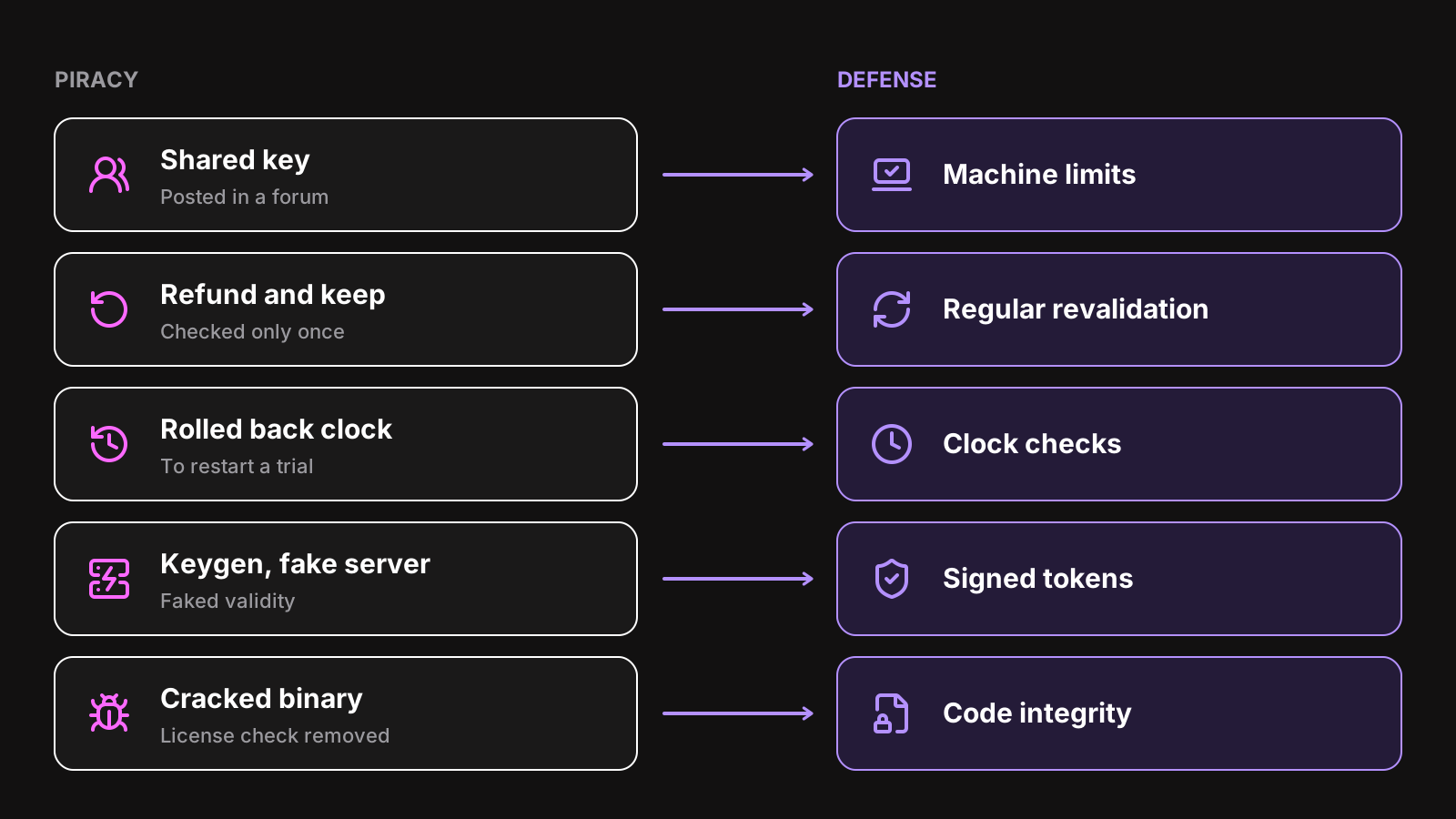
“Piracy” covers several different things, and each one has its own fix. Ordered from the most common to the rarest:
Shared keys
The most common form by far, and the least malicious. A customer gives their key to a coworker, a friend, or posts it in a forum. The key is real, so a simple “is this key valid?” check says yes.
The fix: count the computers each key is used on, and refuse new ones above a limit. A personal license on 2 or 3 computers covers a laptop and a desktop. A key shared with 50 people stops working for 47 of them. See how to get a unique machine id in Electron for how computers are told apart.
Refund and keep
A customer buys, asks for a refund, and keeps using the app. If your app checked the key once at activation and never again, nothing tells it the license was canceled.
The fix: check the license again regularly. The app keeps a signed token that expires after a week or two, and renews it in the background. A refunded license can’t renew, so the app locks at the end of the token.
Rolled back clocks
Trials and yearly licenses rely on dates, and dates rely on the computer’s clock. Set the clock back a month, and an expired trial is fresh again.
The fix: compare the clock with a time source the user doesn’t control, like a server’s time, and remember the latest time seen so a rolled back clock is noticed offline too. The Electron SDK does both: see clock tampering.
Keygens and fake license servers
If your app accepts any key that matches a pattern, like a checksum on the last characters, someone will write a program that generates valid-looking keys: a keygen. If your app trusts whatever the license server answers, someone will point it to a fake server that always says yes.
The fix: never let the app decide what’s valid on its own. Keys are random, and only the server knows which exist. The server’s answers are signed with a private key, and the app verifies them with a public key it ships with. Nobody can produce a valid answer without the private key, so keygens and fake servers have nothing to fake. See offline validation for how a signed token is verified.
Cracked binaries
The rarest form, and the hardest one to stop: someone modifies your app itself, so it skips the license check. For a native app, that means patching the machine code. For an Electron app, it can be as easy as unpacking app.asar and editing a JavaScript file.
The fix: make modification harder and more visible. Run the license check where it’s hard to reach, sign your code, and check that your files haven’t changed. This raises the bar. It doesn’t remove it.
What anti-piracy software can’t do
Every check that runs on the customer’s computer can, in the end, be removed by someone with enough time, a debugger and the motivation. Large companies with dedicated teams and expensive protection get cracked, sometimes within days of a release.
That’s not a reason to do nothing. It’s a reason to aim for the right goal:
- Stop casual piracy. Most people who would use a shared key would never download a crack from a sketchy site. Machine limits and regular checks stop them, and some of them buy.
- Make cracks short-lived. A crack works on one version. If every update brings real improvements, cracked users are stuck on an old one, and every update costs the cracker more work.
- Don’t fight the rest. Someone who goes through the trouble of finding, downloading and running a cracked binary was rarely going to pay. Each hour you spend fighting them is an hour not spent on the app paying customers use.
A layered setup for a desktop app
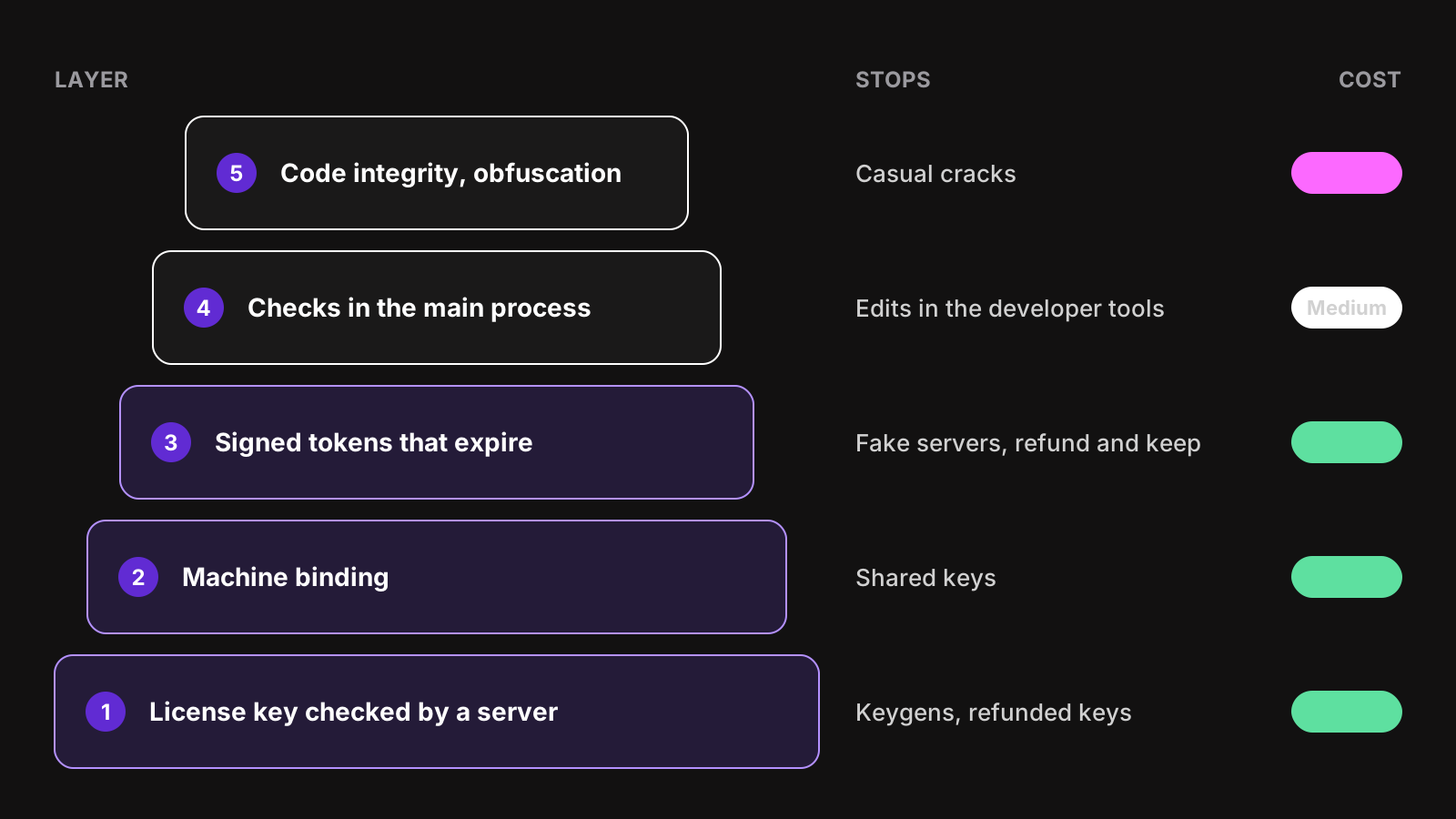
No single layer does the job. Stacked, a few cheap ones stop almost everything worth stopping.
1. Keys checked by a server
Generate keys randomly, store them on a server, and have the app ask the server whether a key is valid. This alone ends keygens, and lets you cancel any key: a refunded purchase, a key posted publicly, a chargeback.
2. Bind keys to machines
Send a fingerprint of the computer with each check, and let the server count the computers per key. Set the limit to what an honest customer needs, not to 1: a customer who can’t use the app on their own laptop and desktop will be angrier than a pirate.
3. Signed tokens that expire
The server answers with a signed token, valid for a limited time. The app verifies it on each launch, works offline while it’s valid, and renews it before it expires. This is what makes refunds, cancellations and deactivations reach the app, and what stops fake servers. Choose the lifetime with your customers in mind: see max offline duration.
4. Checks where they’re hard to reach
In an Electron app, check the license in the main process, and keep the features that matter behind that check: exporting, saving, syncing. Anything in the renderer can be changed from the developer tools. See run the check in the main process.
Some vendors also spread the check over several places, and run it at different moments, so removing one call isn’t enough. That makes a crack longer to produce, at the cost of more code paths to test.
5. Code integrity and obfuscation
Make your app harder to modify:
- Sign your code, so macOS and Windows warn about a modified binary. See how to code sign an Electron app.
- In Electron, turn on the fuses that stop running your app as plain Node.js and that check
app.asaragainst a hash. - Obfuscate or compile your JavaScript to bytecode, so the license check isn’t a readable
if.
These are covered in detail in how to protect your Electron app’s source code. They’re the most expensive layer, in build complexity and sometimes in performance, so add them last, and only if cracks become a real problem.
Don’t punish paying customers
Anti-piracy software has a long history of hurting the wrong people. Every one of these has happened to a real app, and each one costs more in refunds and reviews than piracy did:
- Locking the app when the license server is down. A network error isn’t a refused license. Keep running on the stored token, and only lock on an answer from the server that says the license is no longer valid.
- Locking the app offline too quickly. A customer on a 12 hour flight should be able to work. Tokens valid a week or two cover nearly everyone.
- Refusing a customer’s new computer. Hardware changes, and so do fingerprints. Let customers free their old computers themselves, or replace the oldest computer automatically.
- Treating a suspicion as proof. Never delete files, corrupt projects or show insulting messages on a “cracked” detection. In 2004, the developer of a small app made it wipe the user’s home folder when a known pirated key was used. It’s still the example everyone cites of what not to do.
Before shipping any check, ask what happens to an honest customer when it misfires. If the answer is “they lose their work”, don’t ship it.
Turn pirates into customers
Some piracy is a pricing problem. A few changes win back more than any protection:
- A free trial. Many people pirate to try. A free trial with the full app gives them a legitimate way.
- Regional pricing. At the price of a week’s salary, piracy is the only option. A lower price in those countries turns some pirates into customers.
- A fast checkout. Every extra step between “I want this” and “it works” is a reason to look for a crack instead. See how to sell an Electron app.
- Value only paying customers get: updates, sync, support, a cloud feature that needs a valid license on the server side.
Know how much piracy you have
Before investing in more protection, measure. Your license server already knows the signs:
- Keys at their machine limit, with new computers refused every day, are probably shared.
- One key activated in many countries within a week is almost certainly posted somewhere.
- The same key being refused, then working again, after someone deactivated a computer, can be a group taking turns.
When a key is clearly leaked, cancel it, and send its owner a new one: they’re often the victim, not the culprit. With LicenseManager, the events of a license record every activation and refusal, and the usage dashboard shows the licenses at their limit.
Build it or use one
The first three layers need a server: a database of keys and machines, a validation endpoint that signs its answers, a way to cancel keys and deactivate computers, and payment webhooks so refunds reach the license. The client side needs a fingerprint, secure storage, token verification, renewals and clock checks. It’s a few weeks of work, and the server must be up whenever a customer activates.
LicenseManager provides those layers as a service. Your app validates keys against it with the machine’s fingerprint, each policy sets the machine limit and how long the app runs offline, and every answer is an Ed25519-signed token. The Electron SDK verifies and renews the tokens in the main process, and detects clock tampering. Code signing and obfuscation stay on your side, in your build.
Wrapping up
The best anti-piracy software for a desktop app is a short stack: keys checked by a server, a limit on computers per key, signed tokens that expire, and checks where users can’t easily reach them. Together they stop shared keys, refunds kept, rolled back clocks and keygens, which is most piracy. Cracks can still happen: keep them short-lived with regular updates, and don’t spend more on them than they cost you.
Above all, test every check from the point of view of a paying customer. To set up the license side in an Electron app, read how to add license keys to an Electron app, or see pricing.