 LicenseManager
Most people won’t pay for a desktop app they haven’t used. A free trial lets them install it, try it on their own files, and buy once they’re convinced. It’s also one of the easiest ways to lift sales of a paid Electron app.
There are three common ways to build one, each with a different trade-off between friction for your users and how easy the trial is to reset.
What a trial needs to do
- Start at a known moment: the first launch, or when the user asks for one.
- Count down, and tell the user how many days are left.
- End, even when the computer is offline, and even if the user changes the clock.
- Convert: let the user buy and unlock the full app without reinstalling it.
- Not restart when the user reinstalls the app, or at least not too easily.
Option 1: a local timestamp
The simplest trial stores the date of the first launch on the computer, and compares it with the current date on each launch.
import { app } from "electron";
import { existsSync, readFileSync, writeFileSync } from "node:fs";
import { join } from "node:path";

const TRIAL_DAYS = 14;
const file = join(app.getPath("userData"), "trial.json");

export function trialDaysLeft() {
  if (!existsSync(file)) {
    writeFileSync(file, JSON.stringify({ startedAt: Date.now() }));
  }
  const { startedAt } = JSON.parse(readFileSync(file, "utf8"));
  const elapsed = (Date.now() - startedAt) / 86_400_000;
  return Math.max(0, Math.ceil(TRIAL_DAYS - elapsed));
}
It works offline, needs no server, and asks nothing of the user. It’s also trivial to reset:
- Deleting the file restarts the trial.
userDatais a well-known folder, and uninstallers often remove it. - Changing the clock extends the trial forever.
- Editing the file sets any date.
You can make it harder: store the date in several places, including the system keychain which survives uninstalls, sign the value with a key embedded in the app, and refuse to run when the clock goes back before the last time you saw. But a local trial can always be reset by someone who looks for how, because every piece of it lives on their computer.
That’s acceptable for many apps. Someone who resets a trial every 14 days for a year was probably not going to buy. If your app is cheap and your audience isn’t technical, a local trial might be all you need.
Option 2: a trial license key
The approach most paid desktop apps use: a trial is a license key that expires. The user asks for a trial on your website with their email, receives a key, and activates it in the app like a paid one.
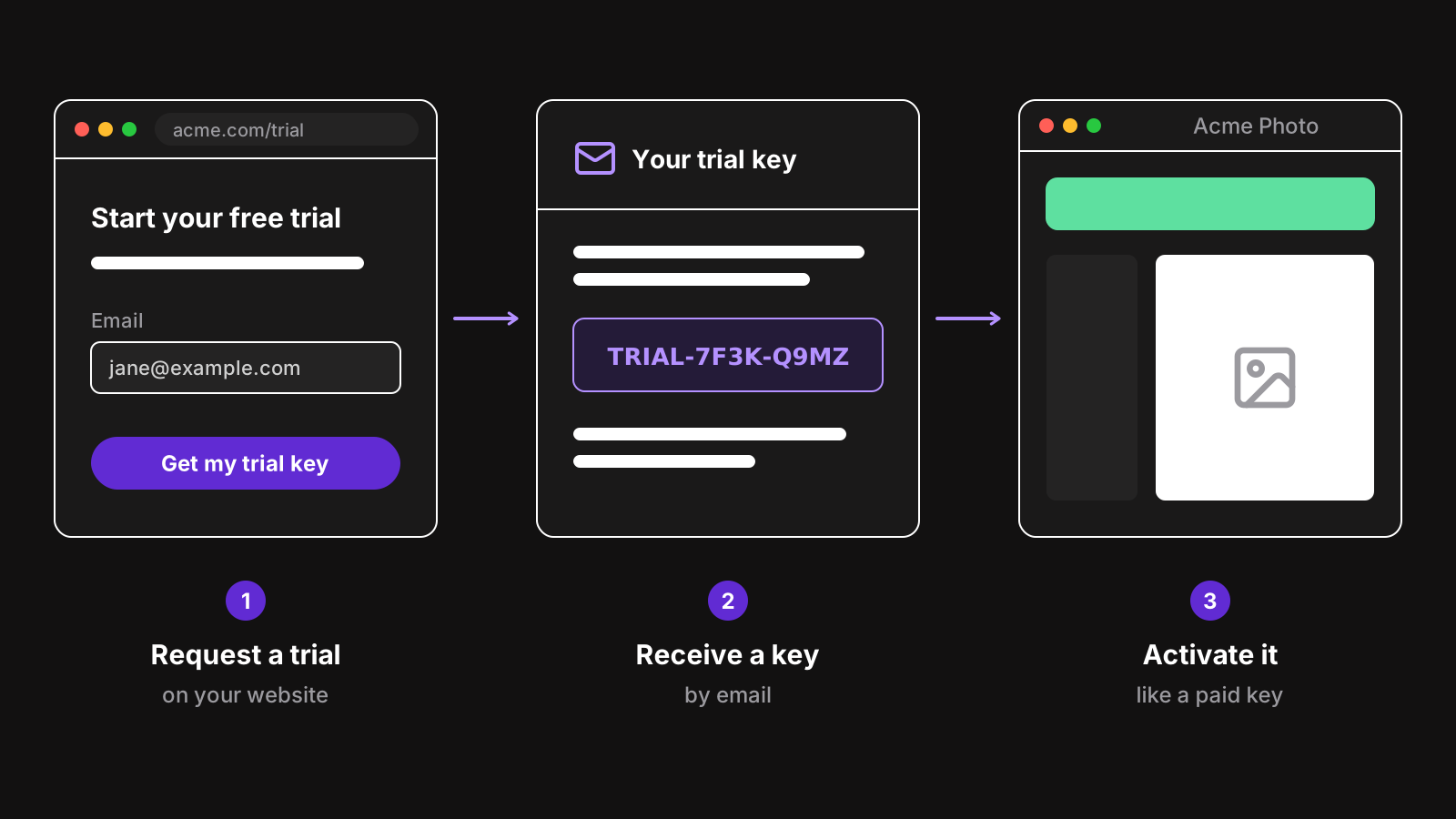
The trial lives on your server, so:
- Reinstalling doesn’t reset it. The key’s expiration date is on the server.
- Changing the clock doesn’t extend it, as long as the app verifies a signed token and detects a clock set back. See clock tampering.
- You get the user’s email, so you can help them during the trial, and remind them before it ends.
- One code path. Trial keys and paid keys go through the same activation and validation. Only the expiration differs.
The cost is friction: the user has to give an email, and switch to their inbox before trying your app. Some won’t. That’s also a filter: the ones who do are more likely to buy.
With LicenseManager, a trial is a license following a trial policy: say 14 days, on one machine. Your website creates it with one API call, and the key is emailed:
curl -X POST https://api.licensemanager.dev/v1/products/x7Kp2QaZ/licenses \
  -H "x-api-key: $API_KEY" \
  -H "Content-Type: application/json" \
  -d '{ "email": "jane@example.com", "policyId": "p4Rt8LmQ", "sendKey": true }'
In the app, the Electron SDK handles it like any other license. When the trial ends, the state becomes EXPIRED, online or offline:
license.onStateChange((state) => {
  if (state === "EXPIRED") showTrialEndedWindow();
});
See the trial licenses guide for the whole setup, including how to give one trial per email.
Option 3: a trial tied to the machine
A middle ground: no email, but the trial is recorded on your server, against a machine fingerprint. On first launch, the app sends its fingerprint; the server records the start date for that machine, and answers with the end date.
Reinstalling doesn’t help, since the fingerprint stays the same, and the server knows the trial already started. The user doesn’t have to do anything.
The downsides:
- You need a server endpoint, and it has to be open to anonymous calls, so expect abuse and rate limit it.
- Some fingerprints change: reinstalling Windows, a new virtual machine. That gives a new trial, which is usually fine.
- You don’t learn who’s trying your app.
See how to get a unique machine id in Electron for how to build a fingerprint that’s stable and hard to fake.
Which one to choose
| Local timestamp | Trial key | Machine-based | |
|---|---|---|---|
| Friction for the user | None | An email | None |
| Needs a server | No | Yes | Yes |
| Survives reinstall | Sometimes | Yes | Yes |
| Resistant to clock changes | With extra work | Yes, with signed tokens | Yes, with signed tokens |
| Gives you the user’s email | No | Yes | No |
| Same code as paid licenses | No | Yes | Partly |
A reasonable default for a paid Electron app: trial keys, because they reuse your licensing code and give you a way to follow up. If you see many people drop off at the email step, try a machine-based trial instead.
Show the trial in the app
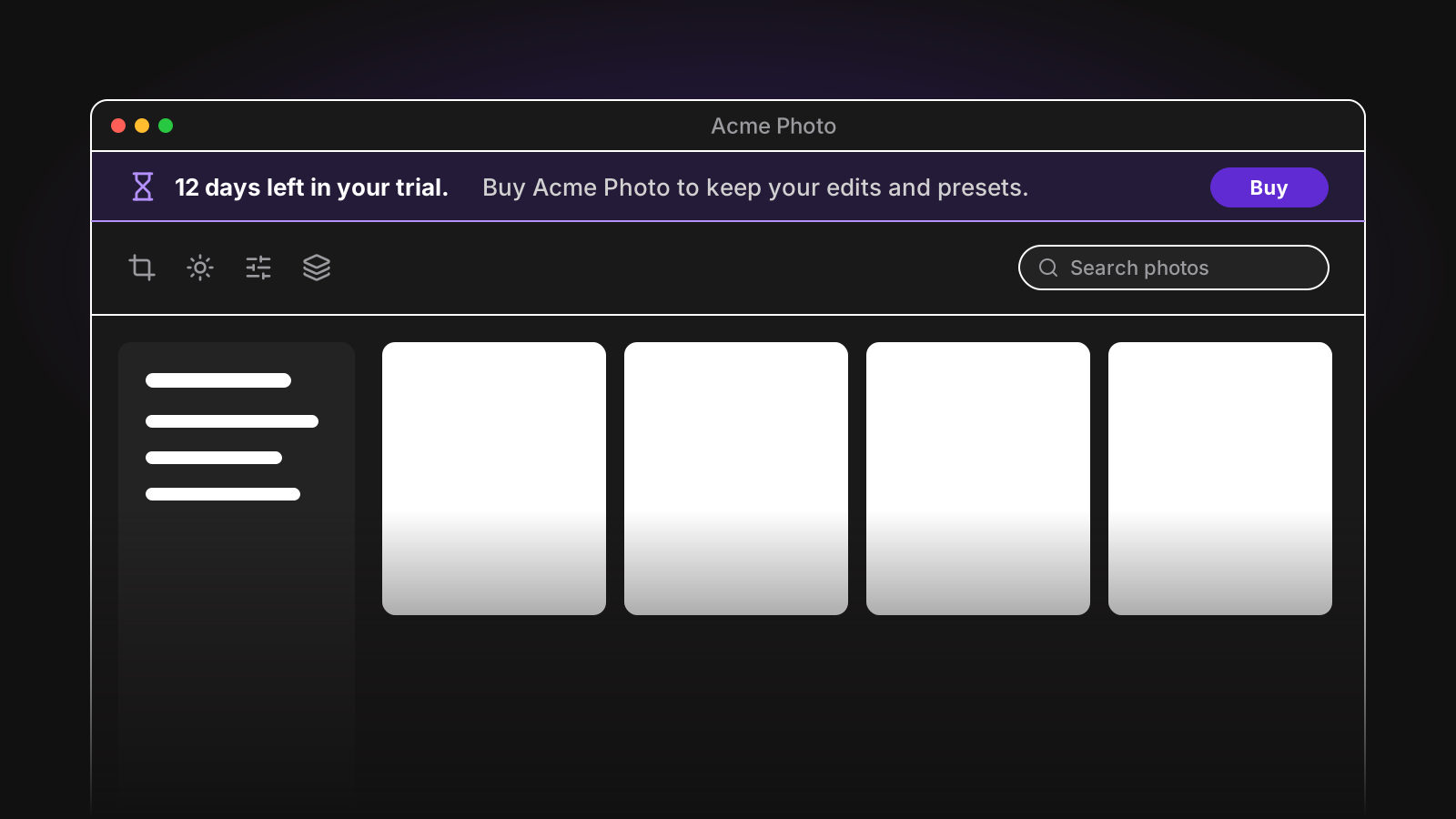
Wherever the trial lives, the app should make it visible without being annoying:
- A small, permanent indicator of the days left, like in the title bar or a banner that can be collapsed.
- A reminder a few days before the end, with a buy button.
- A clear screen when it ends, with a buy button and a field to enter a paid key. Not an error.
- No nagging dialogs on every launch. Users who are evaluating your app shouldn’t be interrupted.
Turn the trial into a sale
When the trial ends, make buying the shortest path: a button that opens your checkout in the browser with the email prefilled, and an activation field right there for the key they’ll receive. See how to sell an Electron app with Stripe Checkout for opening a checkout from the app and coming back to it.
Keep the user’s settings and files after the trial ends. A customer who buys on day 20 and finds their work intact is happy; one who has to start over might ask for a refund.
Wrapping up
A local timestamp is fine for a cheap app with a non-technical audience. For anything else, keep the trial on a server: a trial key if you want the user’s email, a machine-based trial if you don’t. Either way, verify a signed token offline and detect clock changes, so the trial ends when it should.