 LicenseManager
Sooner or later, every Electron developer finds out that their app’s source code ships with the app. Open the .app bundle or the install folder, find app.asar, and run one command:
npx @electron/asar extract "Acme Photo.app/Contents/Resources/app.asar" ./outYour bundled JavaScript is now in ./out, readable. If it includes a license check, someone can find the if that decides whether the app is unlocked, and flip it.
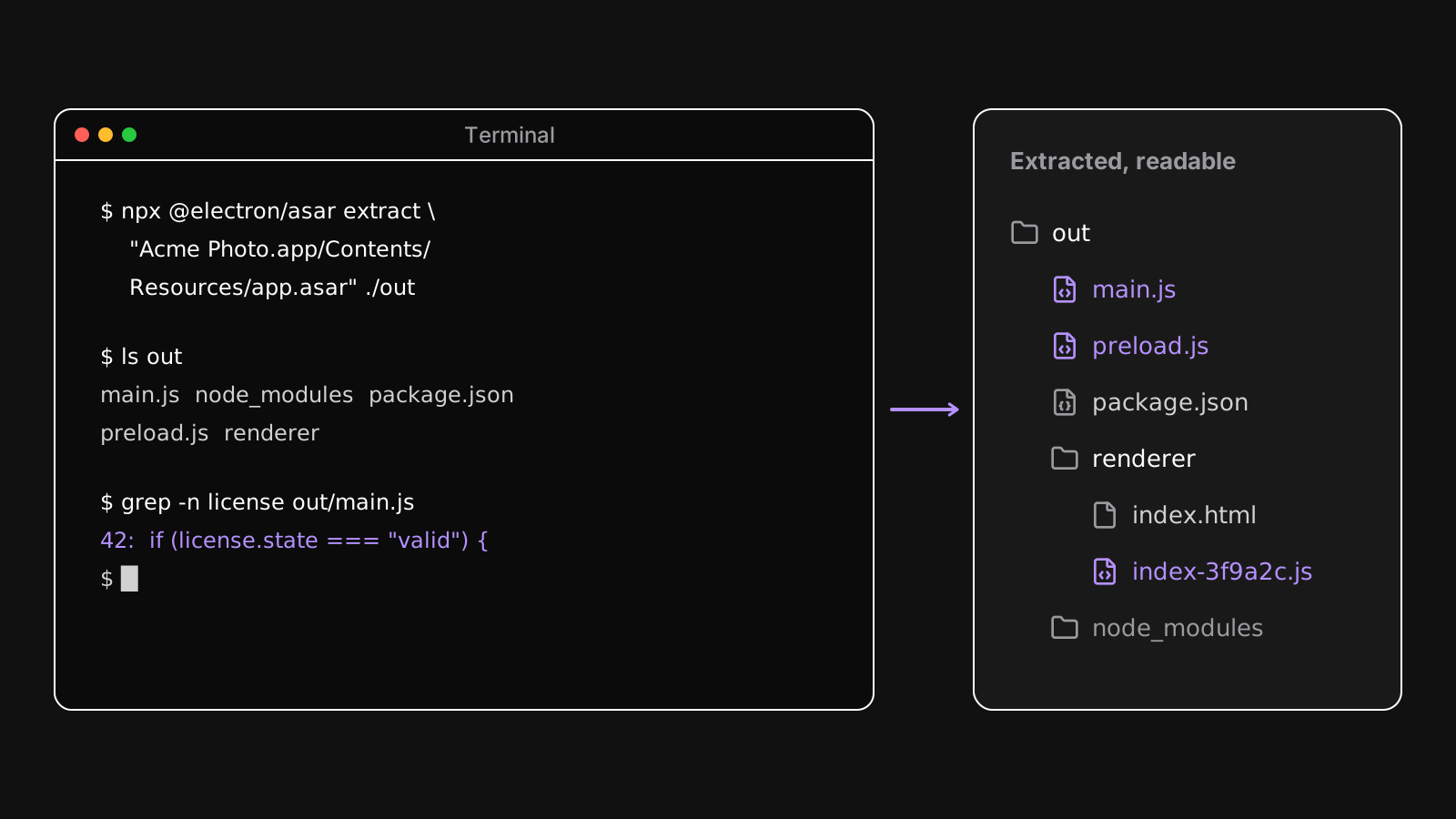
This article covers what you can do about it, and, as importantly, what each technique doesn’t protect.
Set expectations first
You can’t make client-side code secret. Your app runs on a computer the customer controls. Whatever the CPU executes, a determined person with a debugger can read and change. Native apps written in C++ get cracked too, whatever software protection services they use.
So the goal isn’t to make tampering impossible. It’s to:
- make it much more expensive than paying for your app,
- make sure the casual cases fail: copying a key, editing a config file, flipping a flag,
- keep secrets out of the app entirely, so there’s nothing to steal.
The third point matters most, and it’s free.
Keep secrets out of your app
Anything in your app’s files should be considered public. That includes:
- API keys of services you pay for. Put them behind your own backend, which checks who’s calling.
- Private keys. A license system that signs tokens in the app can be used to sign fake ones. Only the server should hold the private key; the app holds the public key, which can only verify.
- Business logic you consider your edge, like a pricing algorithm or a model. Run it on a server if it must stay secret.
A license check designed this way doesn’t rely on hiding anything: the app verifies a token signed by the server, with a public key. Reading the code tells an attacker how the check works, but doesn’t let them create a valid token.
Obfuscate your JavaScript
Obfuscation rewrites your code into an equivalent but hard to read version: renamed variables, encoded strings, flattened control flow, dead code. javascript-obfuscator is the most used tool, with plugins for webpack, Vite and Rollup.
import obfuscator from "vite-plugin-javascript-obfuscator";

export default {
  plugins: [
    obfuscator({
      options: {
        stringArray: true,
        stringArrayEncoding: ["base64"],
        controlFlowFlattening: true,
      },
    }),
  ],
};
What it protects: casual reading, and simple searches like looking for "license" in the code.
What it costs: larger bundles, slower code with heavy options like control flow flattening, and stack traces you can’t read in your crash reports. Keep source maps out of the app, and upload them to your error tracker instead.
Apply it to the parts that matter, like the main process and the license check, rather than to your whole UI.
Compile to V8 bytecode
bytenode compiles JavaScript into V8 bytecode, a .jsc file, and loads it at runtime. The original source isn’t shipped at all.
It’s a step above obfuscation, but with caveats:
- Bytecode is tied to the exact V8 version: compile it with the Electron binary you ship, not with Node.js.
- It must be compiled per architecture, x64 and arm64.
- Some code doesn’t survive the conversion well, like functions whose
toString()you rely on, and class field initializers in some versions. - Decompilers for V8 bytecode exist. They’re harder to use than reading obfuscated code, but they exist.
Use it for the main process, where the build is under your control, and test every release on every platform.
Turn on Electron’s fuses
Fuses are switches baked into the Electron binary at packaging time. Several of them close doors that make tampering easy:
import { FusesPlugin } from "@electron-forge/plugin-fuses";
import { FuseV1Options, FuseVersion } from "@electron/fuses";

export default {
  plugins: [
    new FusesPlugin({
      version: FuseVersion.V1,
      [FuseV1Options.RunAsNode]: false,
      [FuseV1Options.EnableNodeOptionsEnvironmentVariable]: false,
      [FuseV1Options.EnableNodeCliInspectArguments]: false,
      [FuseV1Options.EnableEmbeddedAsarIntegrityValidation]: true,
      [FuseV1Options.OnlyLoadAppFromAsar]: true,
    }),
  ],
};
RunAsNode: falsestopsELECTRON_RUN_AS_NODE=1from turning your app’s binary into a plain Node.js, which can run any script with your app’s identity.EnableNodeOptionsEnvironmentVariable: falseignoresNODE_OPTIONS, which could preload code into your app.EnableNodeCliInspectArguments: falseignores--inspect, so nobody attaches a debugger to your main process with a command line flag.OnlyLoadAppFromAsar: trueloads your app only fromapp.asar, not from anappfolder placed next to it.EnableEmbeddedAsarIntegrityValidation: truechecksapp.asaragainst a hash embedded in the binary, see below.
With electron-builder, set the same options with @electron/fuses in an afterPack hook, or with the electronFuses option of recent versions.
Validate the asar’s integrity
With asar integrity, the packager records the hash of app.asar in the app, and Electron refuses to load an archive that doesn’t match. Someone who extracts the archive, edits your license check, and repacks it gets an app that won’t start.
It’s supported on macOS, and on Windows since Electron 30. The hash lives in the app’s Info.plist on macOS and in a resource of the executable on Windows. What protects that hash from being edited is code signing: change the plist or the executable, and the signature breaks. Integrity checks without code signing protect much less. See how to code sign and notarize an Electron app.
Check the license in the main process
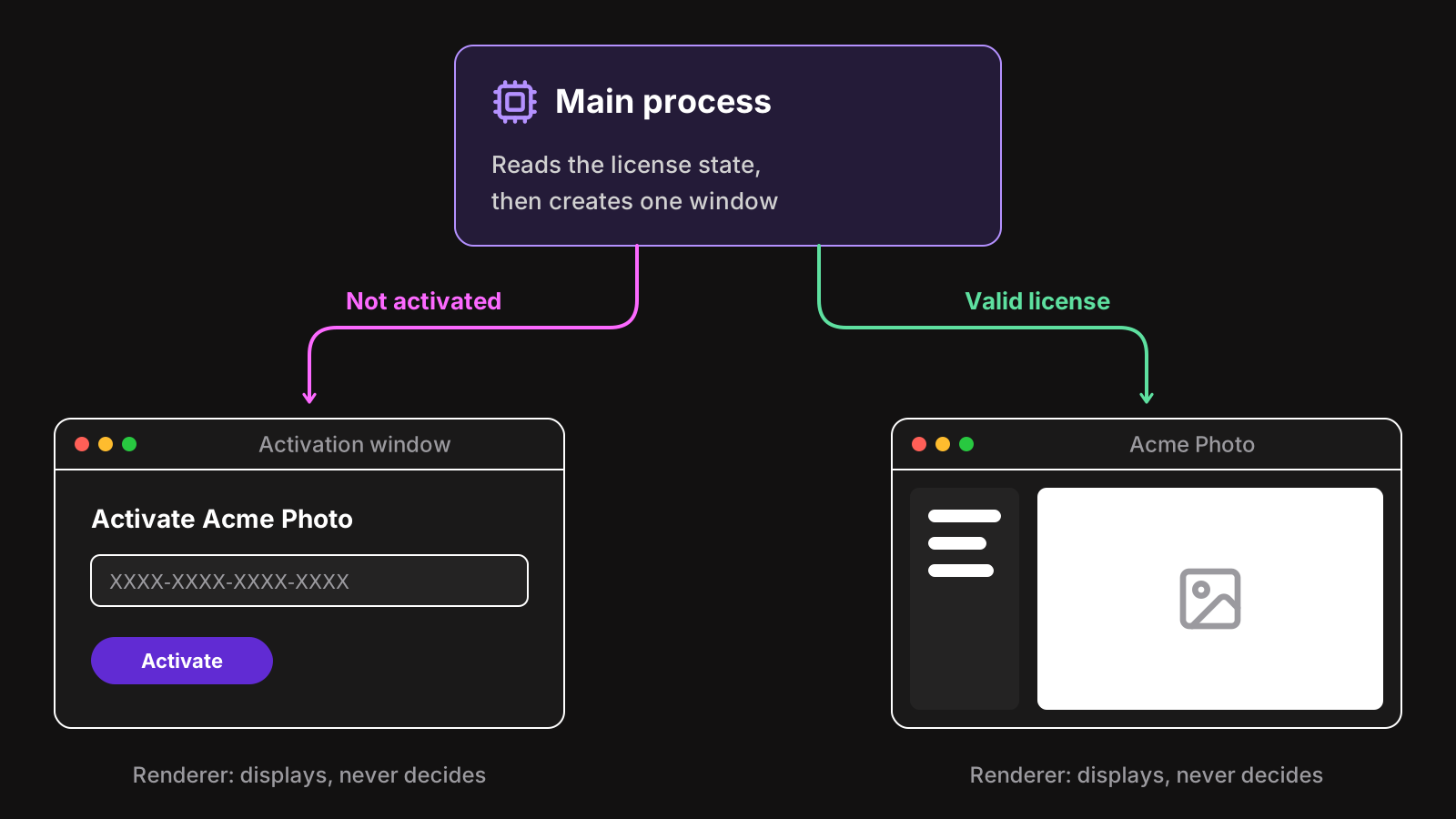
Wherever you check the license, keep it in the main process, and gate the creation of your app window on it, not just the display of a screen in the renderer. A check in the renderer can be bypassed from the developer tools in seconds, and you should disable those in production builds anyway.
Layer the defenses
None of these techniques is enough alone. Together, they turn “edit one line” into a real project:
- No secrets in the app, and server-signed license tokens.
- The license check in the main process.
- Fuses that disable debugging and Node.js mode.
- Asar integrity, with a signed app.
- Obfuscation or bytecode for the main process.
And accept that some people will crack your app anyway. They were rarely going to pay. Spend the rest of your effort on making paying easy, and on a good experience for those who do: a key that activates in one click, works offline, and survives reinstalls.
Wrapping up
An Electron app’s code is readable, and that’s fine as long as nothing secret is in it. Design your license checks so that reading the code doesn’t help forge a license, then raise the cost of tampering with fuses, integrity checks and obfuscation. That’s what LicenseManager’s Electron SDK does: tokens are signed on the server with EdDSA, verified with your public key in the main process, and tied to the machine.