 LicenseManager
Sooner or later, a license check needs to ask someone: is this key real, is it still paid for, is it already used on three computers? A formula inside your app can’t answer those questions. A server can.
A software license server is the system that issues, tracks and checks the licenses of a piece of software: client apps ask it whether they may run, and it answers from what it knows about each license. It can run on the customer’s network, sharing a pool of licenses within a company, or in the cloud, run by the vendor for every customer at once.
This article explains both kinds, how each works in detail, what a license server is made of, and what you’d take on by building your own.
What is a software license server?
A software license server is a central service that controls the use of licensed software. Client applications contact it to activate, check out or validate a license; it checks the license’s terms (validity, expiration, number of seats or machines) and grants or refuses access, keeping a record of where and how each license is used.
The term has other meanings. Windows Server and SQL Server have their own licensing rules (per core, per client access license), and Microsoft’s Remote Desktop license server hands out access licenses to remote desktop users. That’s licensing of server software, for IT administrators. This article is about the server a software vendor uses to license its own product.
The two kinds of license servers
On-premise license servers
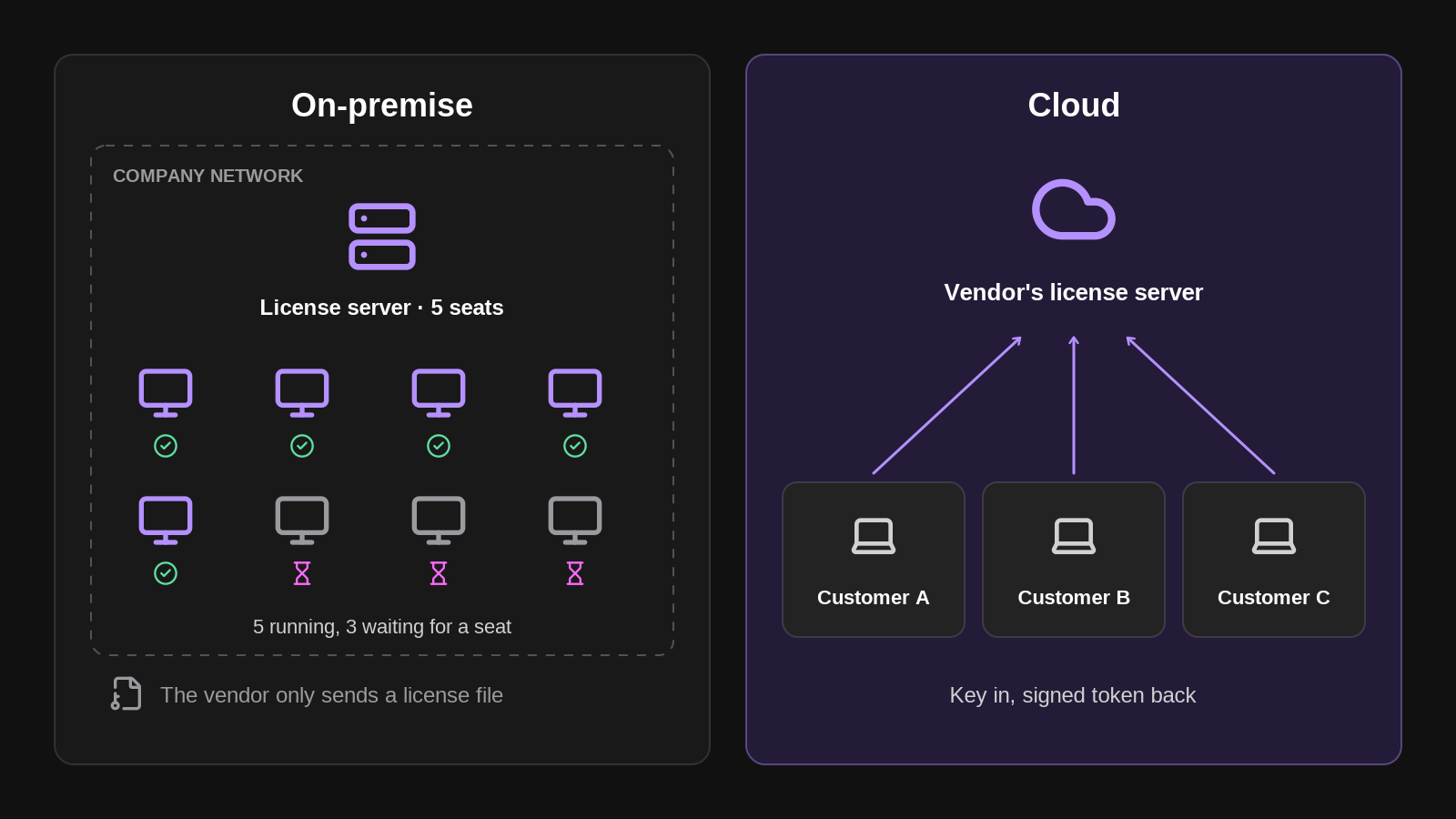
The customer installs the license server on their own network, with a license file from the vendor that says how many seats they bought. Their workstations ask this local server for a license when the software starts, and give it back when it closes. It’s the classic setup of engineering, scientific and design software: FlexNet Publisher (FlexLM), Reprise License Manager (RLM), Sentinel.
It exists for floating licenses: a company buys 10 seats, installs the software on 50 workstations, and any 10 can run it at once. It also works where the internet doesn’t reach, in labs, factories and secure sites.
Cloud license servers
The vendor runs one license server, on the internet, for all customers. Each copy of the app talks to it directly: to activate a key, validate it, renew it. Nothing to install on the customer’s side. It’s what desktop apps sold online use, and what most licensing services provide.
It’s built for node-locked and user licenses sold to individuals and small teams, payments that create licenses automatically, and changes (renewals, refunds, upgrades) that apply everywhere without a new file. Cloud-based license management covers the shift from the first kind to this one.
How an on-premise license server works
For floating licenses, the server keeps a count of seats in use:
- Startup. The server reads its license file, verifies the vendor’s signature and that it runs on the machine the file was issued for (its host ID), and listens on a TCP port. FlexLM’s default range is 27000 to 27009.
- Checkout. When the software starts on a workstation, it asks the server for a seat. If one is free, the server grants it and records who has it. Otherwise, the user waits or is refused.
- Heartbeat. While the software runs, it contacts the server periodically. A workstation that stops answering, because it crashed or lost the network, loses its seat after a timeout.
- Check-in. When the software closes, it returns the seat to the pool.
- Borrowing. A user going on a trip can borrow a seat for a few days, and use the software offline. The seat is missing from the pool meanwhile.
The vendor never sees any of this: the customer’s IT team runs the server, and the vendor only issues license files. That’s a strength for isolated networks, and a cost for everyone else: installing it, keeping it running, and asking the vendor for a new file whenever the server machine changes.
How a cloud license server works
For a desktop app with license keys, the exchange is shorter:
- Activation. The customer enters their key. The app sends it to the license server with a fingerprint of the computer and the app’s version.
- Check. The server finds the license, checks it hasn’t expired, includes this version, and has room for this computer. It records the computer.
- Token. It answers with a token signed with the vendor’s private key, containing the license’s terms and the computer’s fingerprint.
- Offline use. The app stores the token and verifies its signature at every launch with the public key it embeds, without contacting the server.
- Renewal. Before the token expires, the app validates the key again in the background, and receives a fresh token with any change: a renewal, a refund, a deactivated computer.
With LicenseManager, step 1 is a single request:
curl -X POST https://api.licensemanager.dev/v1/products/x7Kp2QaZ/validate-key \
  -H "Content-Type: application/json" \
  -d '{ "key": "7KQ2M-X9ZPA-H4TRC-WN6EY-B3JDF", "fingerprint": "4c32758f9a1e…", "version": "2.3.1" }'
The server’s state is the truth, and the signed token lets the app run when the server can’t be reached. Activation licensing service goes through these steps in detail, and offline validation through the token.
What’s inside a license server
Whatever its kind, a license server is more than an endpoint that answers “valid”:
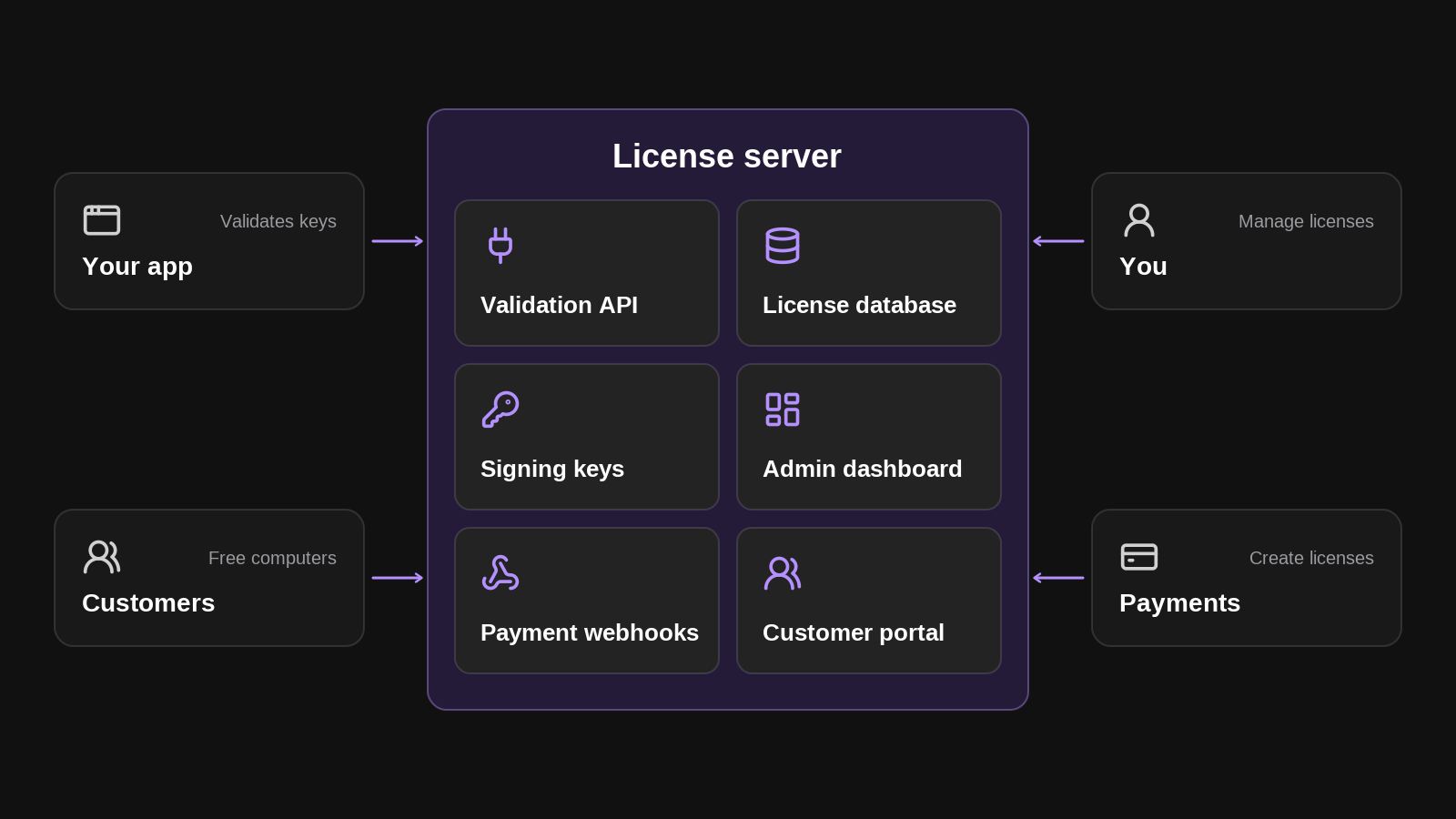
- A validation API, the part apps call. It must be fast, available, and rate limited, since it’s public.
- A license database: products, licenses and their terms, customers, machines, and the history of every validation.
- Signing keys: the private key that signs tokens or license files. If it leaks, anyone can forge licenses, so it never leaves the server.
- An admin dashboard, to look up a customer, extend a license, reset machines, see who uses what.
- Integrations, mostly a payment webhook that creates a license when someone pays, renews it on each subscription payment, and ends it on a refund.
- A customer portal, where customers find their keys and move their license to a new computer. See customer self-service portal.
Availability: what happens when it’s down
A license server is in the path of your app’s startup, so its downtime can become your customers’ downtime. A good design makes that impossible:
- Don’t require the server at every launch. With signed tokens, the app starts on the stored token, and only needs the server to renew it.
- Treat a network error as “unknown”, not “refused”. Only an answer from the server saying the license is invalid should lock the app.
- Renew early. Validate when the token still has days left, so a short outage never reaches anyone.
- For on-premise servers, configure redundant servers, so the loss of one machine doesn’t stop a whole office.
Should you build your own license server?
A first version takes a weekend: a table of keys, an endpoint that looks them up. What takes months is what comes after:
| Build your own | Self-host one | Use a cloud service | |
|---|---|---|---|
| First version | Days | Hours | Minutes |
| Signed tokens, offline | You implement it | Usually included | Included |
| Payments, renewals, refunds | You implement it | Often your own code | Often included |
| Customer portal | You build it | Varies | Often included |
| Uptime, backups, security | Yours | Yours | The provider’s |
| Cost | Your time, then hosting | Hosting and time | A subscription |
Building makes sense when licensing is part of your product’s value, or your constraints are unusual. Self-hosting an open source license server (Keygen CE, for example) fits teams that must keep data on their own infrastructure. For most apps, a cloud service is cheaper than the time it saves. What is licensing software compares the kinds in more depth, and licensing as a service covers the risks of depending on one.
Build it or use one
In LicenseManager, the license server is a hosted API. Your app validates a key with one unauthenticated request, which checks the license’s expiration, version and machine limit, records the machine, and returns a token signed with Ed25519 that the app verifies offline with your public key. Stripe payments create, renew and refund licenses; the dashboard shows every license and its validations; customers manage their computers in the customer portal. Your app keeps running on its token when the API can’t be reached. Floating licenses aren’t a built-in model, but an app can deactivate its machine when it quits with a short max offline duration. See pricing.
Wrapping up
A software license server issues, tracks and checks the licenses of your software. On-premise servers share pools of floating licenses inside companies, with checkouts, heartbeats and borrowing. Cloud license servers serve every customer directly, activating each computer once and returning a signed token the app checks offline.
For a desktop app sold online, a cloud license server is the natural fit, as long as the app never depends on reaching it at launch. For the client side, read how to add license keys to an Electron app, and for the keys themselves, license keys for software.