 LicenseManager
For years, the choice for selling software was simple to state: Stripe if you’d handle sales tax yourself, Paddle if you wanted a merchant of record to do it. Stripe Managed Payments changes that. It’s Stripe’s own merchant of record, built by the Lemon Squeezy team, and it’s where every Lemon Squeezy store is moving. Now both options take taxes off your hands.
Stripe Managed Payments vs Paddle: both sell your software on your behalf and file sales tax and VAT. Managed Payments adds 3.5% to Stripe’s processing fees, works inside your Stripe account with Checkout and Payment Links, and accepts businesses from 37 locations. Paddle charges 5% + $0.50 all-in, has its own checkout and billing, takes PayPal, and accepts sellers from most countries. Neither generates license keys. This article compares them for a software business.
What are Stripe Managed Payments and Paddle?
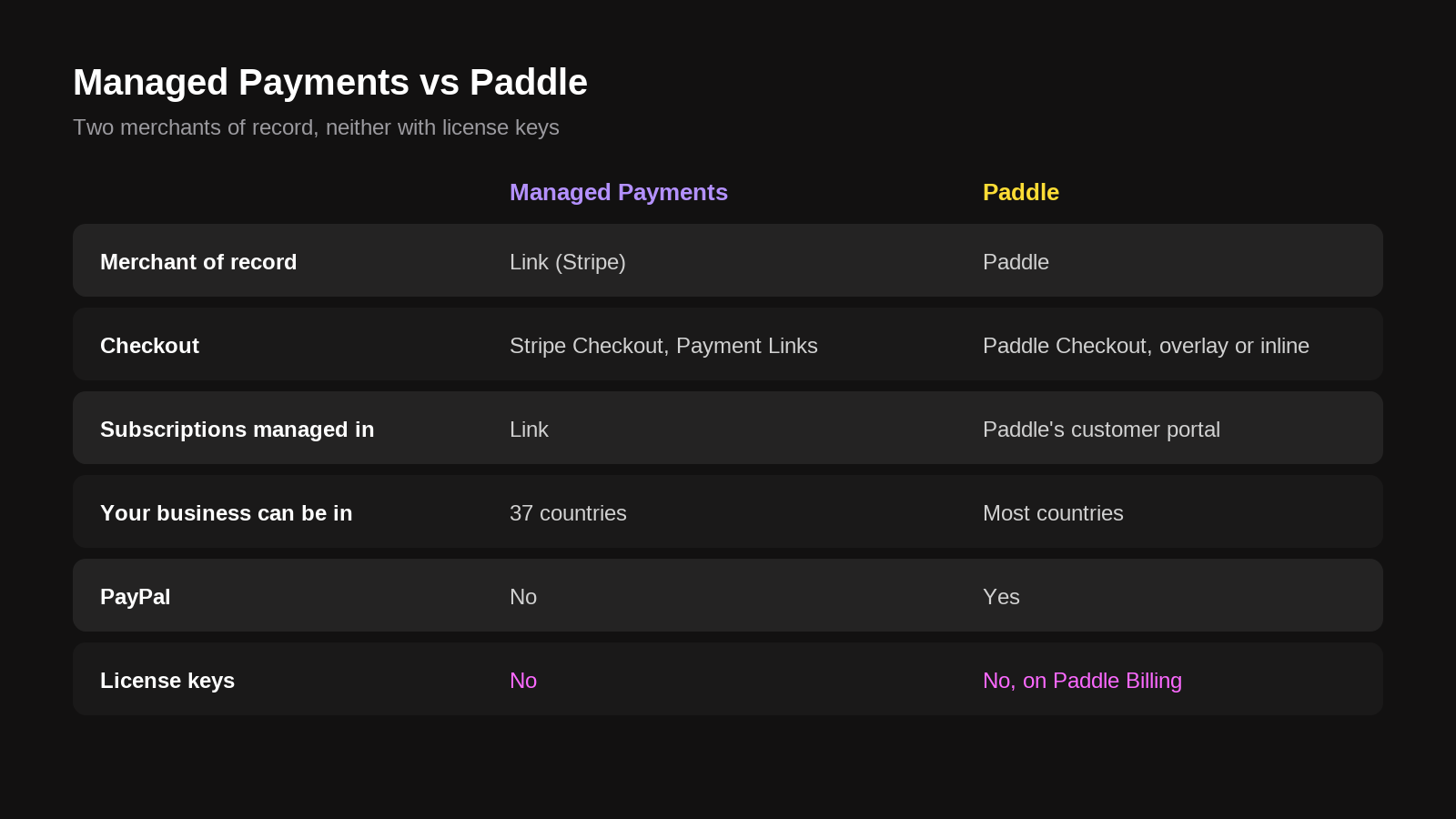
Both are merchants of record: legally, your customer buys from them, and they resell your product. That makes sales tax, VAT and GST their job, worldwide, along with fraud, disputes and the invoices your customers receive.
- Stripe Managed Payments is an option of your Stripe account. You create Checkout Sessions or Payment Links with
managed_payments[enabled]=true, and for those sales, Link, Stripe’s checkout brand, is the seller. The rest of your Stripe account is unchanged. - Paddle is a separate platform: its own account, catalog, checkout, subscriptions and customer portal. Paddle Billing is the current version.
Fees
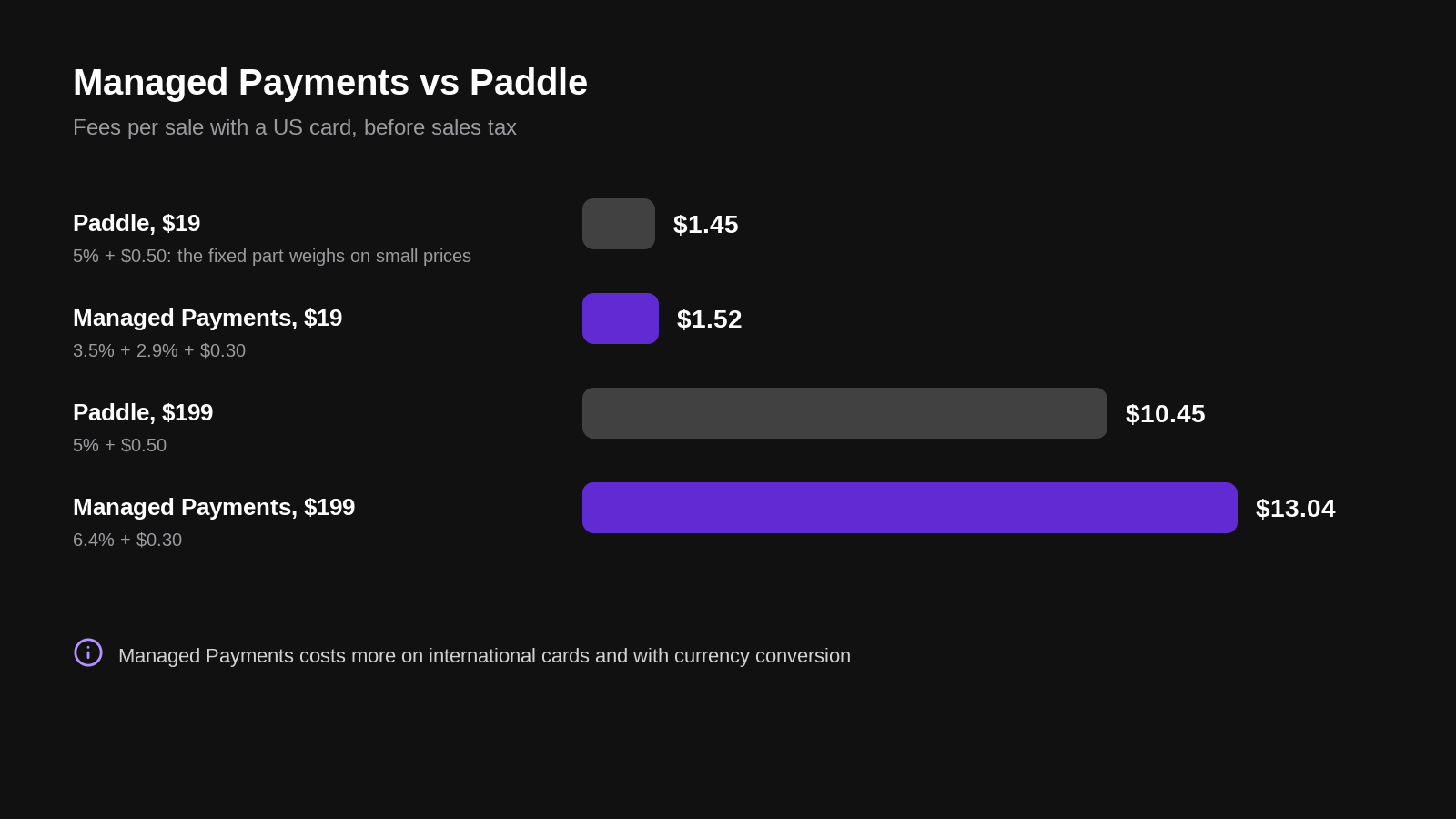
Paddle charges 5% + $0.50 per transaction. Card processing, taxes, fraud and chargebacks are included.
Managed Payments charges 3.5% per successful transaction, on top of Stripe’s standard processing fees: 2.9% + $0.30 for a US card in the US, more for international cards and currency conversion. The 3.5% is computed on the full amount, sales tax included.
With a US card, before tax:
| Price | Paddle | Managed Payments | Managed Payments, migrating from Lemon Squeezy |
|---|---|---|---|
| $19 | $1.45 | $1.52 | $1.14 |
| $49 | $2.95 | $3.44 | $2.46 |
| $199 | $10.45 | $13.04 | $9.06 |
On a US card, the two are close on cheap products, where Paddle’s fixed $0.50 weighs, and Paddle gets cheaper as the price grows: about 6.4% + $0.30 against 5% + $0.50. International cards add Stripe’s surcharges on Managed Payments, while Paddle’s rate stays flat. Lemon Squeezy merchants who migrate pay 1.5% instead of 3.5% until December 1, 2027, which makes Managed Payments the cheaper one until then.
Who can sell
Managed Payments accepts businesses based in the US, Canada, most of Europe and the UK, Australia, Hong Kong, Japan and Singapore: 37 locations, after an eligibility review. Products must be digital and fully automated, like software, SaaS, downloads or self-paced courses, sold directly to customers.
Paddle accepts sellers from most countries, also after a review, for software and digital products.
If your business is outside Managed Payments’ list, the question is settled: Paddle, or another alternative.
Checkout
Managed Payments uses Stripe Checkout, hosted by Stripe, and Payment Links. No embedded Elements, no custom domain, no custom text, no shipping. Adaptive pricing is always on, so customers pay in their own currency. Stripe picks the payment methods: cards, Apple Pay, Google Pay and Link everywhere, regional ones like Klarna in some countries, no PayPal.
Paddle has its own checkout, as an overlay on your page or inline in it, with localized prices you set per currency, and PayPal, which many consumer buyers expect.
Both open in the browser from a desktop app the same way. See Stripe Checkout in an Electron app and Paddle Checkout in an Electron app.
Subscriptions
Managed Payments subscriptions are Stripe Billing subscriptions, created through Checkout or Payment Links. Customers manage them in Link: cancel, change plan, update their card. You can still update them from the dashboard or the API, and offer Stripe’s customer portal.
Paddle has its own subscription engine, with proration, pauses and a customer portal of its own.
Both retry failed payments and email customers about them.
Refunds and disputes
Both handle disputes for you, and both let you refund from the dashboard or the API.
Managed Payments may refund a customer on its own: within 60 days of a purchase in some cases, or when you don’t answer a customer’s support request within 48 hours. Paddle reviews refund requests made through its API before approving them.
Your data and your stack
This is the real difference. With Managed Payments, everything stays in your Stripe account: products, customers, subscriptions, payouts, the API you know, and every Stripe integration you already use. Sales you don’t want under a merchant of record, like B2B invoices, keep going through plain Stripe in the same account.
With Paddle, payments live in a separate platform with its own API and webhooks. It’s more to learn, and you don’t mix it with Stripe, but it’s independent of Stripe’s roadmap.
License keys
Neither has them. Managed Payments doesn’t deliver files, download links or license keys, as Lemon Squeezy’s migration docs put it, and Paddle Billing dropped the license keys of Paddle Classic. If you sell a desktop app, a plugin or any software with a key, you need a licensing service listening to their webhooks, or your own code.
Stripe Managed Payments vs Paddle, side by side
| Stripe Managed Payments | Paddle | |
|---|---|---|
| Fee, US card | 3.5% + 2.9% + $0.30 | 5% + $0.50 |
| Merchant of record | Link | Paddle |
| Seller countries | 37 | Most |
| Checkout | Stripe Checkout, Payment Links | Overlay, inline |
| PayPal | No | Yes |
| Subscriptions managed in | Link | Paddle’s portal |
| Lives in | Your Stripe account | A separate platform |
| Moving from Lemon Squeezy | Official tooling, 1.5% until Dec 2027 | Manual |
| License keys | No | No |
Which one to choose
- You’re on Lemon Squeezy, in a supported country: Managed Payments. The tooling moves you, and it’s cheaper until December 2027.
- You already use Stripe and want taxes handled for some sales: Managed Payments, without leaving your account.
- Your business is outside the 37 locations: Paddle.
- Your buyers expect PayPal, or you sell expensive software where 5% + $0.50 beats 6.4% + $0.30: Paddle.
- You want your payments independent from Stripe: Paddle.
Where LicenseManager fits
LicenseManager adds the license keys both leave out, with the same features on either:
- With Stripe Managed Payments: connect Stripe, map your prices, and each Managed Payments sale creates a key. Managed Payments sales are ordinary Checkout Sessions and subscriptions on your account.
- With Paddle: connect Paddle, map your prices, and each completed transaction creates a key.
- Subscriptions keep their license valid while they’re paid, on both.
- SDKs for Electron, Tauri and Swift validate keys, limit machines and work offline.
Moving from Lemon Squeezy? Your keys import as they are: see leaving Lemon Squeezy.
Wrapping up
Stripe Managed Payments vs Paddle is now a choice between two merchants of record: Managed Payments inside your Stripe account, for businesses in 37 locations, at 3.5% on top of Stripe’s fees; Paddle as its own platform, for sellers almost anywhere, at 5% + $0.50 with PayPal. Neither creates license keys.
If you’re leaving Lemon Squeezy, start with Stripe Managed Payments vs Lemon Squeezy or migrating from Lemon Squeezy to Paddle. Coming from plain Stripe instead? Paddle vs Stripe covers the processor side.