 LicenseManager
Your first version had one price and one key. Then you added a Pro edition. Then a yearly plan, a team license for 5 computers, a discount for a customer who only needs version 2, and a trial. Now every key in your database means something slightly different, and the answer to “what does this customer get?” lives in a spreadsheet, a few if statements and your memory.
An entitlement management system is where that answer lives instead. It records what each customer is entitled to, keeps it right as they buy, renew, upgrade and get refunded, and tells your app, so the app unlocks exactly that.
This article covers what an entitlement management system is for a software vendor, the entitlements worth tracking, how they flow from checkout to your app, and the edge cases that make them hard to get right.
What is an entitlement management system?
An entitlement management system is the part of your licensing that records what each customer has the right to use: which product and edition, until when, on how many machines, which versions, and with which limits. It creates these entitlements when a customer pays, updates them when the purchase changes, and delivers them to your application, which enforces them.
The term has a second meaning in IT and identity management. In tools like Microsoft Entra, “entitlement management” means controlling which employees can access which internal apps and data, with access requests and approval workflows. Same idea, rights attached to a person, but a different audience. This article is about the first meaning: you sell software, and you need to know and enforce what each customer bought.
Entitlements vs licenses
The two words are often used interchangeably, but they answer different questions:
- A license is the agreement: this customer bought this product, on this date, under these terms. In practice, it’s the key your customer types in, like
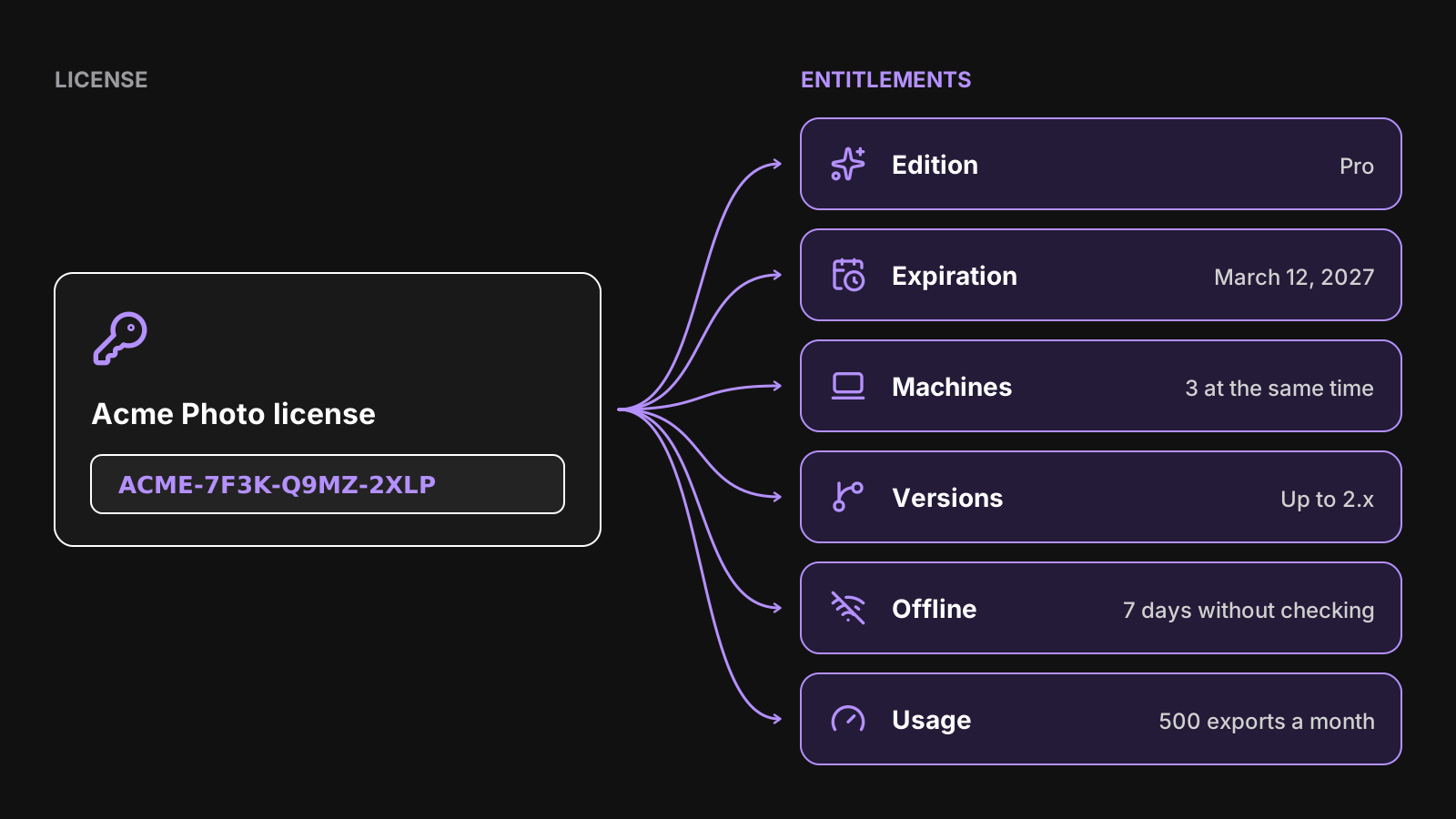
ACME-7F3K-Q9MZ-2XLP. - An entitlement is one right the license grants: Pro features, 3 machines, updates until 2027, works offline for a week.
One license carries several entitlements, and two licenses of the same product can carry different ones. The key is how the customer proves who they are. The entitlements are what your app reads to decide what to unlock.
The entitlements a desktop app needs
Most apps sold with license keys only need a handful of entitlements. Start with these, and add others only when a real offer needs them.
Expiration
When the license stops working: never for a perpetual license, after 14 days for a free trial, at the end of the paid period for a subscription. It’s the entitlement every app needs, and the one most often wrong when it’s handled by hand: a renewal that didn’t update the date locks out a paying customer.
Machines or seats
On how many computers the license can be used at the same time. A personal license allows 2 or 3, a team license one per seat, a site license any number. Counting them needs a reliable way to tell computers apart: see how to get a unique machine id in Electron.
Versions
Which versions of your app the license unlocks. A perpetual license with one year of updates keeps working forever, but only on the versions released during that year. This entitlement is what lets you charge for major upgrades without breaking anyone’s install. See version locks for how the version a license has reached is worked out.
Edition and features
Which features are unlocked: Personal or Business, Standard or Pro. Keep features grouped in editions rather than toggling them one by one per customer. Three editions are easy to explain on a pricing page and to test. Forty feature flags combined per customer are neither.
Offline duration
How long the app keeps working without checking the license again. It’s rarely listed as an entitlement, but it is one: an air-gapped customer needs months, a regular laptop a week or two. It also decides how fast any other change reaches the app, as explained below.
Usage limits
How much of something the customer can use: exports per month, projects, API calls. These are the hardest to enforce in a desktop app, because the count lives on the customer’s machine, where it can be reset. Only meter what you can count on a server, or what isn’t worth cheating for.
How an entitlement management system works
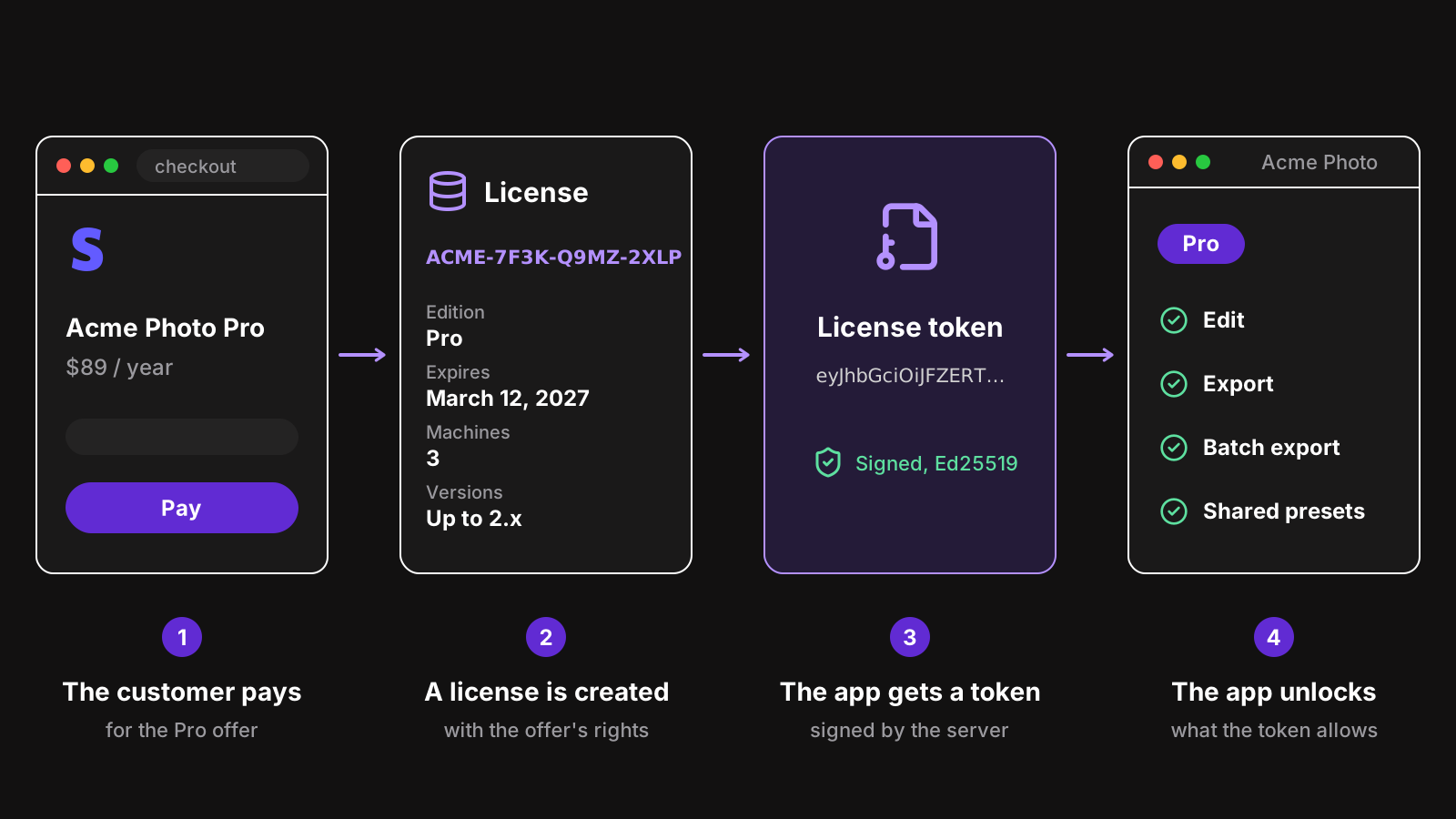
Whatever tool you use, entitlements go through the same four steps, from the sale to the feature your customer clicks on.
1. A sale creates the entitlements
The payment is the source of truth. When a checkout completes, the system creates a license with the entitlements of the offer that was bought. With Stripe, that means mapping each price to an offer: the Pro yearly price creates a license with the Pro edition, 3 machines and an expiration one year later. Never compute entitlements from what the customer typed in the app, and never let the app grant them.
See how to add Stripe Checkout to an Electron app for the checkout side.
2. Offers are templates, licenses are copies
Define each offer once, as a template: Trial, Personal, Business. When a license is created, it copies the template’s entitlements. You can then change one license without touching the others, for the customer who negotiated 10 machines instead of 5.
Copying matters for another reason: grandfathering. When you change the Personal offer from 2 machines to 3, existing customers keep what they paid for, unless you choose to update them. In LicenseManager, the templates are policies, and a license keeps the terms it was created with: see policies and licenses.
3. The app receives the entitlements, signed
Your app asks for the license’s entitlements when the customer enters their key, and again regularly. The answer must be signed by your server, with a private key the app never sees. The app verifies the signature with the public key it ships with. Without the signature, anyone can edit a JSON file in the app’s data folder and give themselves the Business edition until 2099.
A signed token also lets the app work offline: it stores the token, checks the signature and the dates on each launch, and only needs the network to get a new one before it expires. See offline validation for what such a token holds and how to verify it.
4. The app enforces them
The app reads the verified entitlements, and unlocks what they allow. In an Electron app, do the check in the main process, not only in the window: a customer can open the developer tools and flip a variable in the renderer, but not in the main process. See gating your windows.
Keep the mapping from entitlements to features in one place, so that adding an edition is a one line change:
type Edition = "personal" | "business";

const features: Record<Edition, ReadonlySet<string>> = {
  personal: new Set(["edit", "export"]),
  business: new Set(["edit", "export", "batch-export", "shared-presets"]),
};

/** Whether the verified license unlocks a feature. */
export function can(edition: Edition | null, feature: string) {
  return edition !== null && features[edition].has(feature);
}
Then every feature asks the same question, can(edition, "batch-export"), and your menus, buttons and IPC handlers stay consistent.
Keeping entitlements in sync
Creating entitlements at checkout is the easy part. Most of the work is changing them afterwards, at the right moment:
- Renewals. Each paid period moves the expiration forward. A subscription that renews in Stripe but not in your licensing locks out a paying customer the next morning.
- Failed payments. Give a grace period before removing anything: most failed renewals are expired cards, fixed within days.
- Upgrades and downgrades. A customer moving from Personal to Business should keep their key, and see the new features at the next check.
- Refunds and cancellations. A refund removes the entitlements, right away or at the end of the period, depending on your policy.
- Machines. A customer who replaces their laptop frees a seat on the old one, ideally without emailing you: see self-service licensing.
Each of these comes from an event in your payment provider, usually a webhook. Handling them all, in the right order, without losing one when your server is down, is what turns “a table of licenses” into an entitlement management system. For subscriptions, see how renewals, grace periods and plan changes are handled in LicenseManager.
Edge cases
These are the cases that tend to show up once you have a few hundred customers.
Changes take time to reach the app
If the app works offline with a token valid for 7 days, a change you make on the server reaches the app at its next check, up to 7 days later. That’s true for an upgrade, and for a refund. Choose the offline duration with both in mind: short for subscriptions, where you want a canceled customer to stop quickly, longer for perpetual licenses, where customers on planes matter more. The tradeoffs are in max offline duration.
Customers with several licenses
A customer can own a Personal license from 2023 and a Business license bought last week. Decide whether entitlements add up, or whether the app only reads the key that’s entered. Reading only the entered key is simpler and almost always enough: upgrade by giving the customer a new key, or by moving their license to the new offer.
Changing the clock
Expiration dates are checked against the computer’s clock, which the customer controls. Set the clock back a year, and an expired trial works again, unless the app notices. See how the Electron SDK detects clock tampering.
Exceptions for one customer
Sooner or later, a customer asks for 20 seats instead of 10, or for version 3 on a version 2 license. Because licenses copy their offer’s entitlements, you change that one license. Keep a note of why, in the license’s metadata or your CRM: in a year, nobody will remember.
Build it or use one
You can build an entitlement management system yourself. The pieces:
- A data model for offers and licenses, with entitlements copied from offer to license, and overrides.
- Webhooks from your payment provider for payments, renewals, failed payments, plan changes, refunds and disputes, processed once each, in order.
- A validation endpoint that checks the key, counts machines, resolves the allowed versions and returns a signed token.
- Client code that verifies the token, stores it securely, renews it, and handles every way validation can fail.
- An admin screen to look up a customer and change their license, and a customer portal so they can do the routine changes themselves.
That’s several weeks of work, and a server that has to answer every time a customer opens your app.
LicenseManager handles the entitlements a desktop app needs: each policy sets a duration, max machines, max offline duration and updates, and each license copies them, with per-license changes. Stripe payments and subscriptions create and update licenses through price mappings. For editions, use one policy per edition: switching a subscription to a price mapped to another policy moves the license to it, with the same key. Anything else you need to attach, like an order number or a custom limit, goes in the license’s meta.
Wrapping up
An entitlement management system answers one question reliably: what does this customer get, right now? Keep the list of entitlements short (expiration, machines, versions, edition, offline duration), define them once per offer, copy them to each license, and let your payment events keep them current.
Then deliver them to your app signed, and enforce them where customers can’t reach. If you’re setting up licensing for the first time, start with how to sell an Electron app, or see pricing to get entitlements without running the server.