 LicenseManager
To ship an Electron app, you need to turn your code into installers: a DMG for macOS, an .exe for Windows, an AppImage or a .deb for Linux. Two tools do almost all of that work in the Electron ecosystem: electron-builder and Electron Forge.
Both are mature, both are used by large apps, and both will get you to a signed installer. They take different approaches though, and switching later costs a few days. Here’s how they compare.
The short version
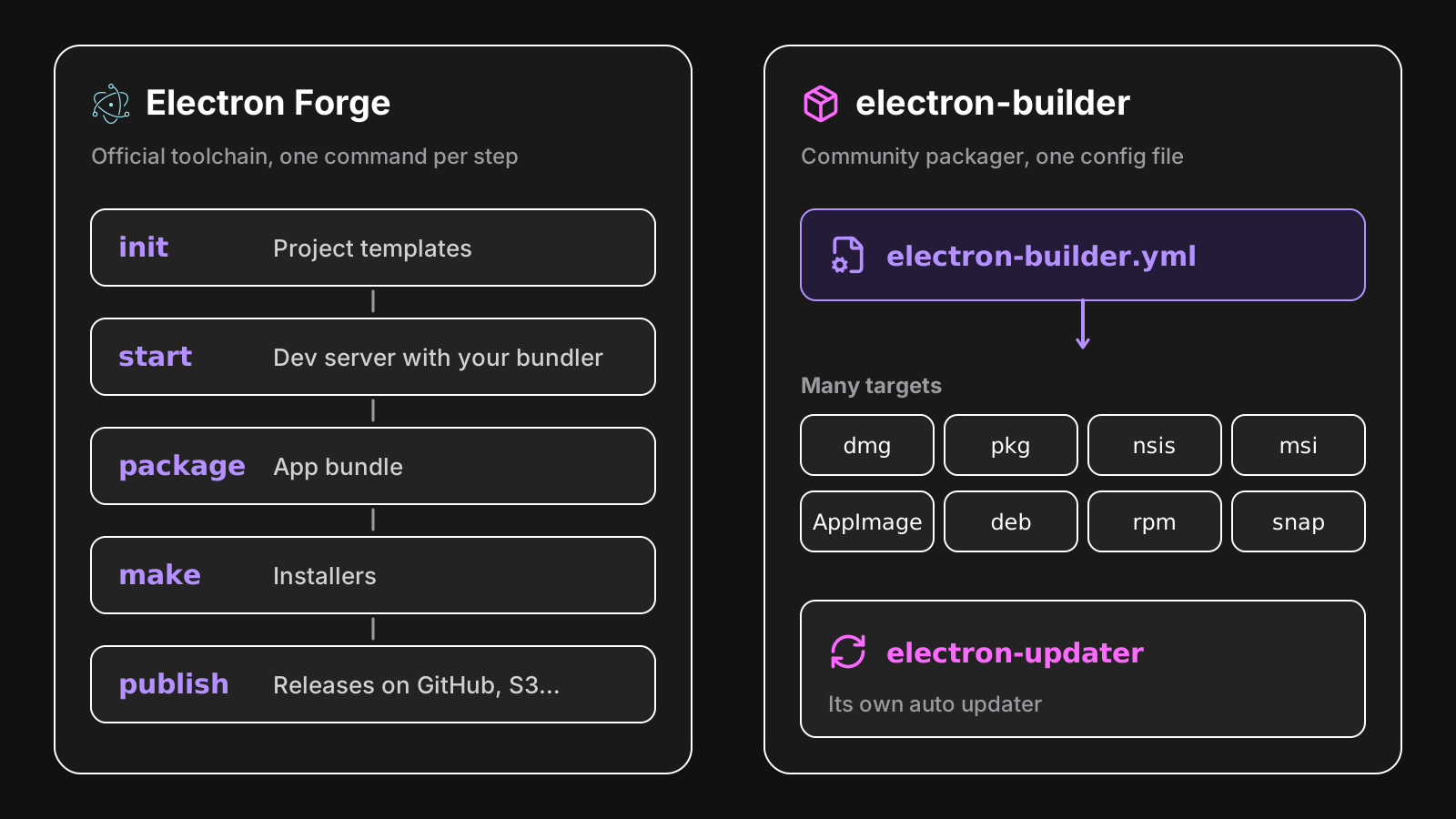
- Electron Forge is the official tool, maintained by the Electron team. It’s a full toolchain: project templates, a dev server with your bundler, packaging, installers and publishing, built from Electron’s own packages.
- electron-builder is a community project focused on packaging. It does one job, turning your app into installers for every platform, with one configuration file, and comes with its own auto updater.
Getting started
Forge starts with a template:
npx create-electron-app@latest acme-photo --template=vite-typescriptYou get a working app with Vite, TypeScript, and the scripts to run, package and make installers: npm start, npm run package, npm run make.
electron-builder comes into an existing project. You install it, add a configuration, and a script:
npm install --save-dev electron-builderappId: com.acme.photo
productName: Acme Photo
directories:
output: dist
mac:
target: [dmg, zip]
win:
target: nsis
linux:
target: [AppImage, deb]{
"scripts": {
"dist": "electron-builder"
}
}It doesn’t care how you build your JavaScript: you bundle with Vite, webpack or esbuild yourself, and point it at the output. Templates like electron-vite set up both.
Installers and targets
| Target | Electron Forge | electron-builder |
|---|---|---|
| macOS DMG | Yes | Yes |
| macOS PKG | Yes | Yes |
| macOS ZIP | Yes | Yes |
| Windows Squirrel | Yes (default) | Yes |
| Windows NSIS | Community maker | Yes (default) |
| Windows MSI | Yes, with WiX | Yes |
| Windows MSIX / AppX | Yes | Yes |
| Linux deb, rpm | Yes | Yes |
| Linux AppImage | Community maker | Yes |
| Linux Snap, Flatpak | Yes | Yes |
electron-builder supports more targets out of the box, and its NSIS installer is more configurable than Squirrel.Windows: install for the current user or for all users, choose the install folder, custom pages. Squirrel.Windows installs silently into the user’s AppData, with no options, which some customers and IT departments dislike.
Auto updates
This is often what decides.
- electron-builder comes with electron-updater, which updates from any static host (GitHub releases, S3, your own server), on macOS, Windows (NSIS) and Linux (AppImage), with differential downloads and staged rollouts.
- Electron Forge relies on Electron’s built-in
autoUpdater, based on Squirrel, on macOS and Windows. For open source apps, update.electronjs.org is free. For a private app, you need a Squirrel-compatible server.
If you sell a closed source app and don’t want to run an update server, electron-builder’s updater is the easier path. We compare both updaters in detail in Electron auto update, explained.
Code signing
Both sign and notarize macOS apps with Apple’s tools, through the same underlying packages (@electron/osx-sign and @electron/notarize), and both sign Windows installers.
electron-builder has built-in options for more Windows signing setups, including Azure Trusted Signing with win.azureSignOptions. With Forge, signing is configured per maker. See how to code sign and notarize an Electron app for both.
Bundlers and development
Forge has plugins for webpack and Vite: npm start runs your bundler’s dev server, starts Electron, and reloads on changes. It’s the most integrated setup, at the cost of tying your build to Forge’s plugin.
electron-builder doesn’t run your app in development. You use your bundler’s tooling, or electron-vite, which handles the main process, the preload scripts and the renderer, and calls electron-builder for the installers.
Configuration
electron-builder has one configuration, in electron-builder.yml or in package.json, with options for each platform and target. Long, but everything is in one place, and well documented.
Forge’s forge.config.ts is code: makers, publishers and plugins are classes you import and configure. More flexible, with hooks at each step of the build, and type checked.
Native modules
Both rebuild native modules for Electron’s version of Node.js, with @electron/rebuild. Both pack your app into an app.asar archive, and need native .node files unpacked from it: electron-builder does it automatically, Forge with its auto-unpack-natives plugin.
Who maintains them
Electron Forge lives in the electron organization, maintained by the Electron team, and moves with Electron’s own packages. Its documentation is part of Electron’s.
electron-builder is a community project, very widely used, with frequent releases. It has been around longer, and most of the answers you’ll find online about packaging Electron apps assume it.
How to choose
Pick Electron Forge if:
- you’re starting a new app and want the official, integrated toolchain,
- your app is open source, and update.electronjs.org covers your updates,
- you like configuring your build in code, with hooks.
Pick electron-builder if:
- you need auto updates from a static host, without running a server,
- you want NSIS installers, AppImage, or a lot of control over installers,
- you already have a build setup, and only need packaging.
Both are good choices. The worst choice is spending a week deciding: pick one, ship, and switch later if you really hit a wall.
Licensing works with both
Whichever you pick, adding license keys to your app is the same: it’s code in your main process, not a packaging step. LicenseManager’s Electron SDK uses a native module for the keychain, which electron-builder unpacks by default, and Forge with auto-unpack-natives. See packaging.