 LicenseManager
You sell a desktop app with Paddle, or you’re about to. You open the Paddle dashboard to set up license keys, the way the old tutorials show, and the option isn’t there. On Paddle Billing, there is no license key fulfillment, no activation API, and the desktop SDKs that checked keys are gone.
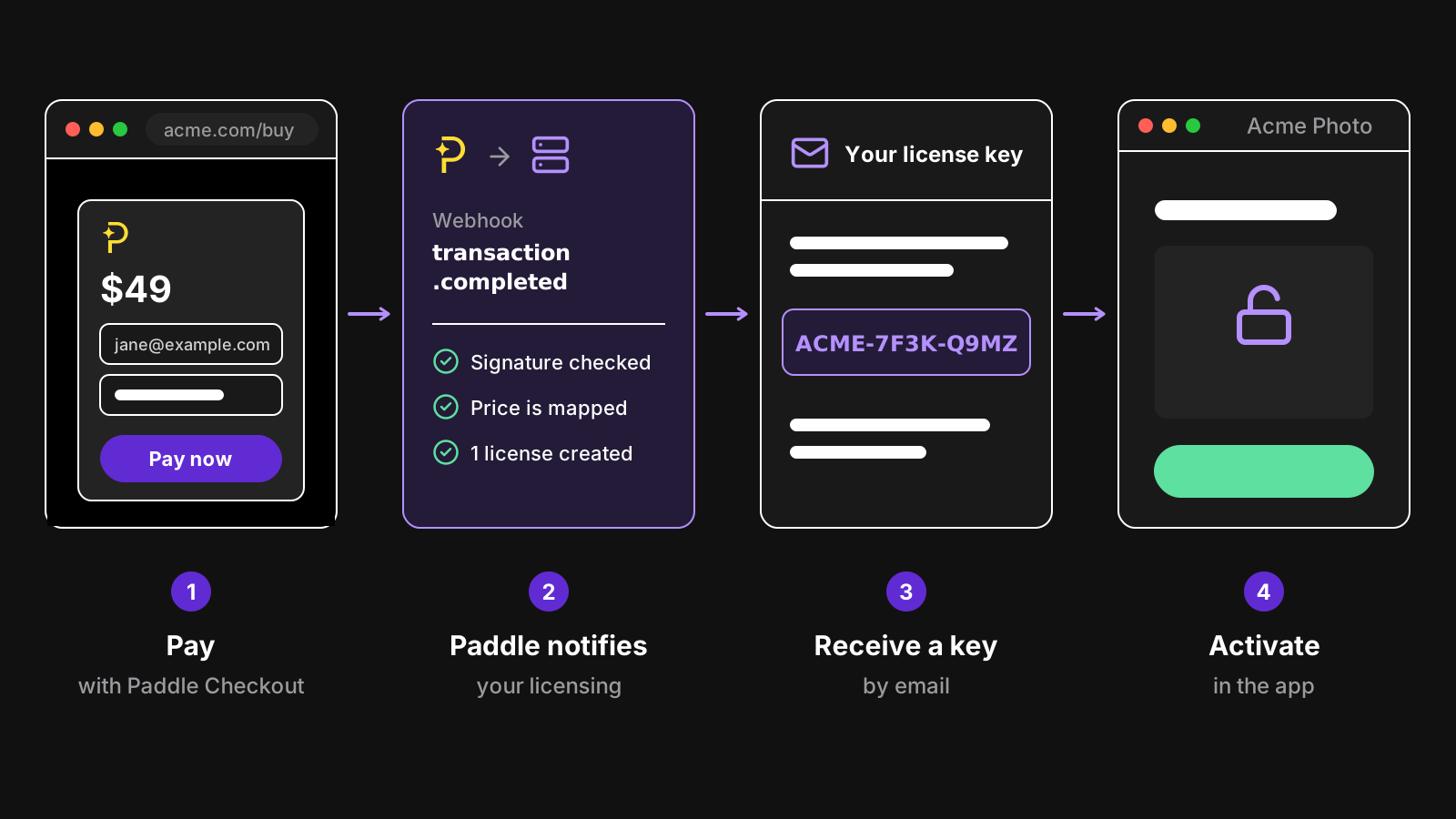
Paddle license keys now come from outside Paddle: Paddle takes the payment and notifies your server or a licensing service, which creates the key, emails it, and checks it when your app activates. This guide explains what changed between Paddle Classic and Paddle Billing, the two ways to deliver keys from Paddle payments, the webhook code if you build it yourself, and how to move existing Classic keys without asking customers for new ones.
What happened to Paddle license keys?
Paddle has two platforms, and they are separate products with separate APIs:
- Paddle Classic, the original platform, could generate a license key for each purchase, email it in the receipt, and activate it through the Paddle Mac SDK and the Windows SDK, with a limit of activations per key. Classic is closed to new sellers.
- Paddle Billing, the current platform, was built for subscriptions and SaaS. Its fulfillment is yours: Paddle sends events, like
transaction.completed, and you grant access. It has no license keys and no activation, and the Windows licensing SDK was removed.
So if you signed up for Paddle recently, you are on Billing, and keys have to come from somewhere else. If you are still on Classic, your keys work, but moving to Billing means moving them too.
Paddle remains your merchant of record either way: it sells the app to your customer, collects and pays VAT and sales tax, sends the receipt, and handles chargebacks, for 5% + $0.50 per transaction. Only licensing left. The same goes for Stripe’s merchant of record, Managed Payments: see Stripe Managed Payments vs Paddle.
What a Paddle license key setup needs
Classic did five things for a desktop app. To replace it, list them:
- Create a key for each unit bought: 3 seats, 3 keys, or one key with 3 activations.
- Email it to the customer right after the payment.
- Activate it in the app: check the key, count the computer, refuse it past the limit.
- Keep it working offline, without asking a server on every launch.
- Follow the payment: refunds end the license, subscriptions renew it and stop it.
The first two happen on a server that listens to Paddle. The last three need an API your app calls, and code in the app.
Option 1: build it with Paddle webhooks
Paddle calls a notification destination (a webhook URL) with every event you subscribe to. You create it in Developer tools → Notifications, and Paddle gives you a secret to check the signature of each request.
The events to listen to
| Event | When | What to do |
|---|---|---|
transaction.completed | A purchase is paid, one-time or the first payment of a subscription | Create the licenses, email the keys |
subscription.created | A subscription starts | Create one license for the subscription |
subscription.updated | Renewal, plan change, pause, cancellation | Push back the expiration, change the plan, or end it |
adjustment.updated | A refund is approved or rejected | End the license when its refund is approved |
transaction.completed is the one Paddle recommends for fulfillment. A renewal of a subscription is also a completed transaction: check its origin or its subscriptionId so a renewal extends the existing license instead of creating a new one.
The handler
With the official Node.js SDK, the handler checks the signature, reads the customer’s email, and creates one key per unit of the prices you sell:
import { Environment, EventName, Paddle } from "@paddle/paddle-node-sdk";

const paddle = new Paddle(process.env.PADDLE_API_KEY!, {
  environment: Environment.sandbox, // Environment.production when live
});

// Your prices, and how many computers each key allows
const PRICES: Record<string, { maxMachines: number }> = {
  pri_01hv8xpersonal: { maxMachines: 3 },
};

export async function handle(rawBody: string, signature: string) {
  const event = await paddle.webhooks.unmarshal(
    rawBody,
    process.env.PADDLE_WEBHOOK_SECRET!,
    signature, // the Paddle-Signature header
  );
  if (event.eventType !== EventName.TransactionCompleted) return;
  if (await alreadyProcessed(event.eventId)) return; // Paddle retries

  const transaction = event.data;
  const customer = await paddle.customers.get(transaction.customerId!);

  const keys: string[] = [];
  for (const item of transaction.items) {
    const price = PRICES[item.price?.id ?? ""];
    if (!price) continue;
    for (let i = 0; i < item.quantity; i++) {
      keys.push(await createLicense(customer.email, price.maxMachines, transaction.id));
    }
  }
  if (keys.length > 0) await emailKeys(customer.email, keys);
  await markProcessed(event.eventId);
}
Pass the raw body, as Paddle sent it: a body parsed and serialized again doesn’t match the signature. Answer with a 200 quickly, within a few seconds, and do the slow work after; Paddle retries failed deliveries, which is why the handler skips events it already processed.
createLicense is where your own licensing starts: generate a random key (see how to generate license keys), store it with the customer, the computers allowed and the transaction, and expose an activation endpoint for the app.
What you end up running
The webhook is the small part. Around it, you keep:
- An activation API, always up, that counts computers per key and refuses the extra ones. See node-locked licenses.
- Signed tokens for offline use, so a launch on a plane doesn’t fail, and nobody can edit a local file to unlock the app.
- Subscription state, kept in sync with
subscription.updated: renewals,past_duewith a grace period while Paddle retries the card, pauses and cancellations. - Refunds: a refund made in Paddle should end the license, and a license canceled during your money back guarantee should trigger the refund.
- Lost keys and new computers: customers write to you unless they have a self-service portal.
- Sandbox and live, kept apart: two Paddle accounts, two secrets, two sets of keys.
It’s a few weeks of work, and a server you can’t let go down, since a missed event is a customer who paid and has no key.
Option 2: connect a licensing service to Paddle
A licensing service does the same job, hosted. With most, you still write the webhook handler and call their API from it. A few connect to Paddle directly: you give them access to your Paddle account, choose which prices create licenses, and they receive the events themselves.
Check these before you pick one:
- Paddle Billing, not only Classic. Older integrations used Classic’s webhooks and fields, which Billing doesn’t send.
- One-time and recurring prices. A subscription should give one license that renews, not a new key every month.
- A desktop SDK. Without one, your app calls the API and handles storage, offline tokens and clock changes itself. See how to add license keys to an Electron app for what that code involves.
- Refunds both ways. Paddle reviews refunds, so a refund requested by the service can stay pending; the license should reflect it.
- Key import, if you come from Classic.
Our comparison of licensing services lists which ones integrate with Paddle, Stripe, or neither.
Migrating Paddle Classic license keys to Billing
If you sell on Classic today, the move to Billing has two halves: payments, which Paddle helps you migrate, and keys, which you have to move yourself.
- Export your keys from Classic, with the customer’s email, the product and the activations allowed.
- Import them into your new licensing, keeping each key as it is. Customers keep the key they have, and nothing changes for them.
- Ship an app update that validates keys against the new service instead of the Paddle SDK. On first launch, it activates the key the app already stored, without asking the customer anything.
- Point new sales at Billing prices, mapped to the same offers.
Keep the old SDK check as a fallback for a few weeks, for customers who update late, then remove it. RabbitGUI did this kind of switch with an activation on launch that nobody noticed; see migrating from another license manager.
Taxes, fees and offline checks
A few things to know before you choose:
- Paddle’s fee covers taxes, licensing doesn’t. 5% + $0.50 includes card processing and tax handling. The licensing service is a separate cost, flat or per active license, rarely a percentage.
- Offline checks are the app’s job. Paddle never sees your app; whether it runs on a plane depends on the tokens your licensing issues and how long they last.
- Custom prices. Prices created on the fly for one transaction aren’t in your catalog, so they can’t be mapped to an offer: sell catalog prices.
- Sandbox first. A Paddle sandbox account takes test cards and sends the same events. Run a whole purchase, key email and activation there before going live.
How LicenseManager handles Paddle license keys
LicenseManager connects to Paddle Billing with an API key you create in Paddle, and creates the notification destination itself. You map each Paddle price to a policy, which sets the computers allowed, the duration and the updates, and from then on:
- each completed transaction creates one license per unit bought and emails the keys;
- each subscription gets one license that renews with every payment, with a grace period while Paddle retries, and expires when it ends or is paused;
- licenses canceled during your money back guarantee request their refund in Paddle, shown as pending until Paddle approves it (refunds);
- customers find their keys, free a computer and open the Paddle customer portal from the license portal.
The Electron, Tauri and macOS SDKs activate the key, store it in the system keychain and keep the app working offline on signed tokens. Paddle stays your merchant of record, and LicenseManager takes no cut: see selling with Paddle.
Wrapping up
Paddle Billing dropped license keys, not desktop apps: Paddle still takes the payment and handles taxes, and the keys come from a webhook handler you write or a licensing service connected to Paddle. Either way, the parts that matter to customers are the same: a key in their inbox a minute after paying, an activation that counts their computers, and an app that works offline.
If you’re still comparing payment options, read Paddle alternatives for Mac apps. If Paddle is settled, the next step is the app side: how to add license keys to a Mac app, or to an Electron app.