 LicenseManager

Your app asks for a license key on first launch, and checks it with Lemon Squeezy’s License API. Thousands of customers have pasted a key that lives in Lemon Squeezy. On March 31, 2027, Lemon Squeezy stops processing payments, and its migration to Stripe Managed Payments moves your products, customers and subscriptions, but not one license key.
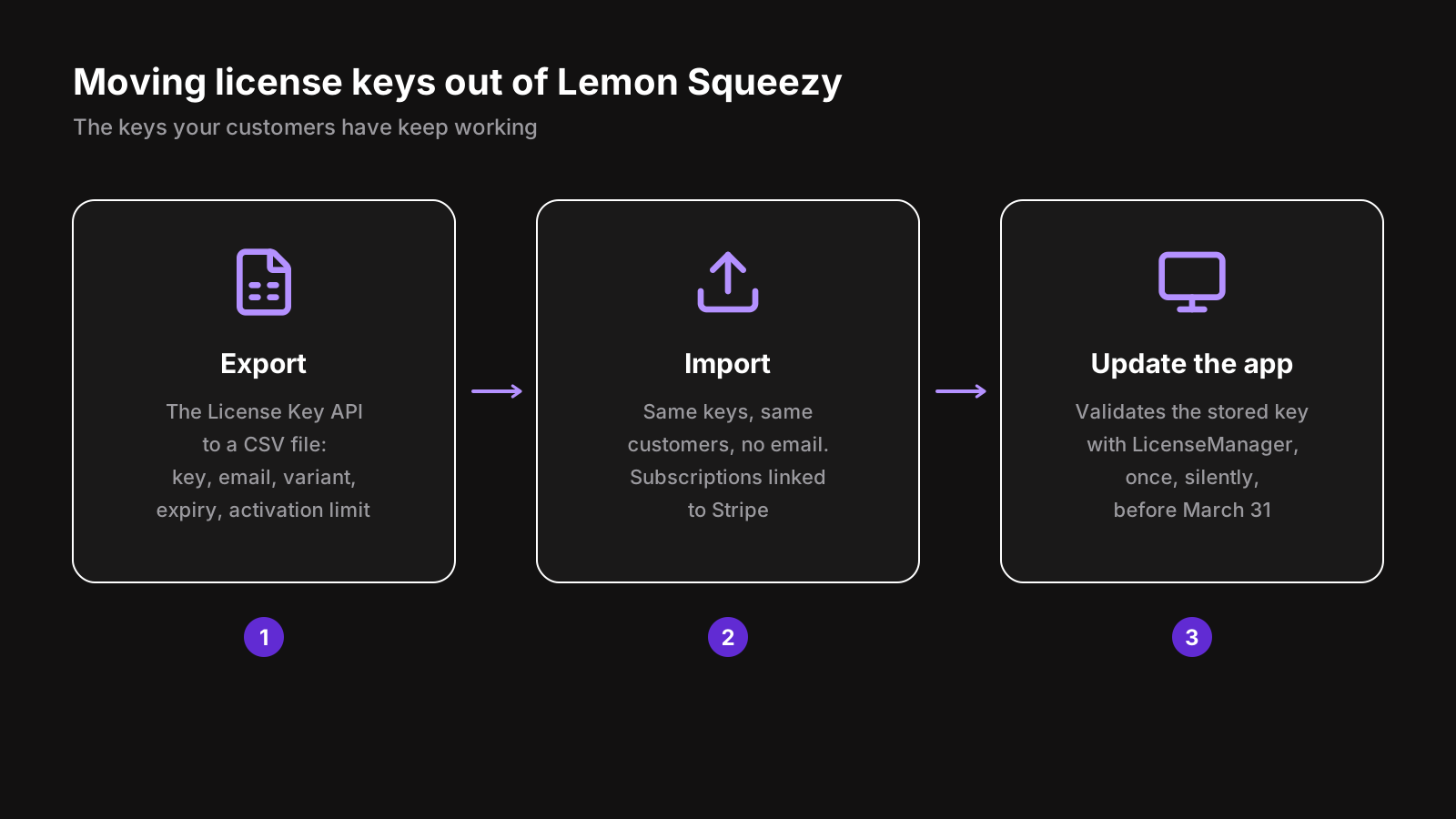
To migrate Lemon Squeezy license keys, you export them with the Lemon Squeezy API, import them into a licensing service with the same keys, link each subscription key to its new Stripe subscription, and ship an app update that validates the stored key with the new service. Done in that order, nobody receives a new key and nobody is locked out. This article walks through each step, with the code.
What happens to Lemon Squeezy license keys?
Lemon Squeezy generates a key for each order of a product with license keys turned on, and your app checks it with three endpoints: activate, validate and deactivate. Stripe Managed Payments, where Lemon Squeezy stores move, doesn’t generate license keys: Lemon Squeezy’s migration docs say you need “a separate solution”, and that customers may lose access to their keys after March 31, 2027.
What happens to the License API itself after the deadline isn’t documented. Plan as if it stops: any app version still calling api.lemonsqueezy.com would then fail to validate its key.
What’s in a Lemon Squeezy license key
Before exporting, know what you’re moving. A license key object holds:
| Field | What it is | Where it goes |
|---|---|---|
key | The full key, as your customer received it | The license’s key, unchanged |
user_email, user_name | The customer | The license’s customer |
activation_limit | How many instances it can be activated on, null for unlimited | Max machines |
instances_count | How many instances are activated now | Not moved: machines register again |
expires_at | When it expires, null for never | The license’s expiration |
status | inactive, active, expired or disabled | Disabled keys are left out |
order_id, order_item_id, product_id, customer_id | Where it comes from | Kept as metadata |
The variant a key was sold as, like Personal or Team, isn’t on the key itself: it’s on its order item. You need it to give each key the right offer in your new tool.
Step 1: export the keys with the Lemon Squeezy API
Lemon Squeezy’s dashboard exports orders, not keys. The Lemon Squeezy API lists them, 100 per page. Create an API key in Settings → API, then run this script with Node.js 20 or later:
// LEMON_SQUEEZY_API_KEY=… node export-lemon-squeezy.mjs > licenses.csv
const API = "https://api.lemonsqueezy.com/v1";
const headers = {
  Accept: "application/vnd.api+json",
  Authorization: `Bearer ${process.env.LEMON_SQUEEZY_API_KEY}`,
};

async function list(path) {
  const items = [];
  for (let page = 1; ; page++) {
    const res = await fetch(`${API}/${path}?page[number]=${page}&page[size]=100`, { headers });
    if (!res.ok) throw new Error(`${path}: ${res.status} ${await res.text()}`);
    const body = await res.json();
    items.push(...body.data);
    if (page >= body.meta.page.lastPage) return items;
    await new Promise((resolve) => setTimeout(resolve, 250));
  }
}

const cell = (value) => {
  const text = value == null ? "" : String(value);
  return /[",\n]/.test(text) ? `"${text.replaceAll('"', '""')}"` : text;
};

const variants = new Map(
  (await list("order-items")).map((item) => [item.id, item.attributes.variant_name]),
);
const keys = await list("license-keys");

console.log("key,email,name,policy,expires_at,max_machines,status,lemon_squeezy_license_key_id,lemon_squeezy_order_id,lemon_squeezy_product_id");
for (const { id, attributes: key } of keys) {
  console.log([
    key.key, key.user_email, key.user_name,
    variants.get(String(key.order_item_id)),
    key.expires_at, key.activation_limit ?? "unlimited",
    key.disabled ? "disabled" : key.status,
    id, key.order_id, key.product_id,
  ].map(cell).join(","));
}
console.error(`Exported ${keys.length} license keys`);
You get a licenses.csv with one row per key. The policy column holds the variant name: create one offer per variant in your new tool, with the same name. If you sell several products, split the file by lemon_squeezy_product_id.
Keep the file private: it holds every key you’ve sold.
Step 2: import them with the same keys
Whatever you import into, two rules matter:
- Keep every key exactly as it is. Keys are case sensitive in most tools. Don’t normalize them, don’t generate new ones.
- Don’t email anyone. Your customers already have their keys. An import that sends 3,000 “Your license key” emails is a support week.
In LicenseManager, open the product’s Licenses page, click Import and drop the file. Lemon Squeezy’s column names are read as they are: key, user_email, activation_limit, expires_at. The dialog shows how each column was read and the rows with problems, like a variant without an offer of the same name, before sending anything. Disabled keys are left out, expired ones imported expired so their customers can renew, and the lemon_squeezy_… columns kept as metadata. Importing the same file again skips the keys already there. See importing licenses for the format and the API.
Try it in a test product first, then import into the live one.
Step 3: link the subscription keys to Stripe
This is the step most migrations get wrong. Lemon Squeezy’s tooling moves your card subscriptions to Stripe, where each one gets a new id, sub_…, and keeps renewing. If your licensing service creates a license for each paid Stripe invoice, the first renewal after the move creates a second license, with a new key, emailed to a customer who already has one, while the imported key expires.
The fix is to tell the licensing service which Stripe subscription pays for which imported key:
- Wait for the subscriptions to move. Customers get at least 14 days’ notice.
- Map the new Stripe prices to your offers. Lemon Squeezy creates one Stripe product per variant.
- Add a
subscription_idcolumn to your CSV, with each key’s Stripe subscription. Lemon Squeezy’s migration report maps Lemon Squeezy customers to Stripe customers: the subscription is that customer’s, in Stripe’s Subscriptions page.
Imported with its subscription, a license renews with it, and expires when it ends, like a license created by a Stripe sale. See linking subscriptions.
PayPal subscriptions can’t move, as Managed Payments doesn’t take PayPal. Their customers subscribe again with a card, which creates a new key: import their old key with its expires_at, so it lasts until the end of what they paid.
Step 4: replace the License API in your app
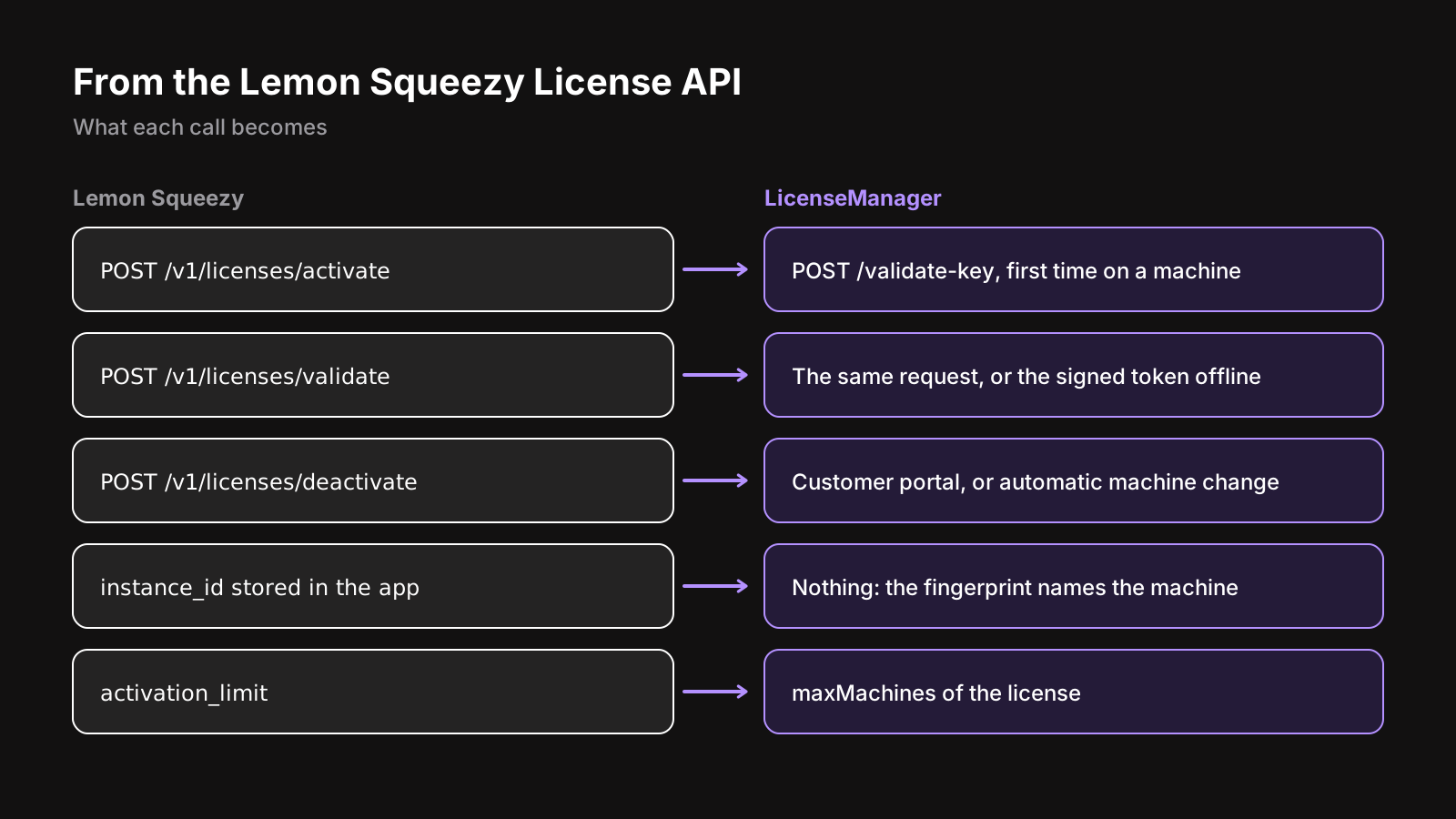
Your app probably does something like this today:
// Activate once, store the instance id, validate on each launch
const res = await fetch("https://api.lemonsqueezy.com/v1/licenses/activate", {
  method: "POST",
  headers: { Accept: "application/json" },
  body: new URLSearchParams({ license_key: key, instance_name: hostname() }),
});
const { activated, instance } = await res.json();
store.set("instanceId", instance.id);
With LicenseManager, activation and validation are the same request, POST /validate-key, with a fingerprint of the machine: the first one on a machine activates it, and the next ones check it. It returns a signed token your app verifies offline, so it keeps working on a plane, which Lemon Squeezy’s online-only API never allowed. In an Electron app, the SDK does all of it:
import { LicenseManager } from "@licenseman/electron";

const license = new LicenseManager({ productId: "x7Kp2QaZ", publicKey: PUBLIC_KEY });
const state = await license.ready();

// First launch of the new version: reuse the key Lemon Squeezy validated
const previousKey = store.get("lemonSqueezyKey");
if (state === "MISSING_KEY" && previousKey) {
  try {
    await license.setLicenseKey(previousKey);
    store.delete("lemonSqueezyKey");
    store.delete("instanceId");
  } catch {
    // Not imported, or expired: show the activation screen
  }
}
The customer doesn’t type anything: the stored key is validated once, silently, and the app carries on. The Tauri and Swift SDKs work the same way, and any other app can send the request directly.
Deactivation moves out of your app: customers free a machine from the customer portal, and a new computer can take the place of one they stopped using on its own, with automatic machine changes. You can drop the “deactivate this device” screen, or keep it with a machine token.
Step 5: run both until the deadline
Old versions of your app keep calling Lemon Squeezy, and new sales may still happen there until your checkout has moved. For the transition:
- Ship the update as early as you can, with auto-updates on (Electron, Tauri), so most customers have it well before March 31.
- Re-import the CSV after new Lemon Squeezy sales: keys already imported are skipped.
- Switch your checkout to Stripe Checkout, a Payment Link or Paddle, with the prices mapped, so new sales create keys in LicenseManager.
- Email customers still on an old version in March, with the date and a download link.
Edge cases
Activations don’t move. The number of instances a key is activated on stays in Lemon Squeezy. Each machine takes a place again at its first validation with the new version: a key activated on 2 machines with a limit of 2 keeps working on both.
Disabled keys are usually refunds or abuse: leave them out. Expired keys are worth importing, so their customers can renew without a new key.
Keys in two stores, or a customer with two emails, become two customers. Merge emails in the file if you care.
Rate limits. The License API allows 60 requests a minute, the main API more: the export script pauses between pages, which is enough for a few thousand keys.
Do it yourself, or use a licensing service
Building it means a database of keys, a webhook handler for Stripe’s checkout.session.completed and invoice.paid, the import, the email, the validation endpoint, machine limits, and the subscription edge case above. Then running it. Software license server lists everything that goes into it.
LicenseManager is built for exactly this move: a CSV import that reads Lemon Squeezy’s columns and links subscriptions, keys created from Stripe, Managed Payments and Paddle sales, and SDKs that validate offline. And we’ll do the import with you for free: see leaving Lemon Squeezy.
Wrapping up
To migrate Lemon Squeezy license keys, export them with the API, import them with the same keys, link each subscription key to its new Stripe subscription, and ship an app update that validates the stored key once, silently. Lemon Squeezy’s tooling won’t do any of it: it’s the one part of the move that’s entirely yours.
Start the export now, and ship the update early. The full step by step, with the Lemon Squeezy specifics, is in the migration guide. Still choosing where to sell next? See Lemon Squeezy alternatives.