 LicenseManager
Every Electron app that signs users in, or asks for a license key, has to store a secret somewhere: an OAuth refresh token, an API key, a license key and its token. For years the answer was keytar, the native module from the Atom team. Atom was sunset in December 2022, and keytar was archived with it.
So what should you use now? Here are the options, and where each one fits.
The options
safeStorage | @napi-rs/keyring | keytar | electron-store | |
|---|---|---|---|---|
| Maintained | Yes, part of Electron | Yes | No, archived | Yes |
| Native module to ship | No | Yes, prebuilt | Yes | No |
| Where data lives | Your files, encrypted | The system keychain | The system keychain | Your files |
| Encrypted at rest | Yes | Yes, by the system | Yes, by the system | No (obfuscation only) |
| Survives uninstall | Depends on your files | Yes | Yes | Depends |
| Linux without a keyring | Plain text fallback | Fails | Fails | Plain text |
safeStorage
safeStorage is built into Electron’s main process. It doesn’t store anything itself: it encrypts and decrypts strings with a key that the operating system protects. You store the encrypted bytes wherever you want.
import { app, safeStorage } from "electron";
import { readFile, writeFile } from "node:fs/promises";
import { join } from "node:path";

const file = join(app.getPath("userData"), "token.bin");

export async function saveToken(token: string) {
  if (!safeStorage.isEncryptionAvailable()) throw new Error("No encryption");
  await writeFile(file, safeStorage.encryptString(token));
}

export async function loadToken() {
  try {
    return safeStorage.decryptString(await readFile(file));
  } catch {
    return null;
  }
}
Call it only after the ready event: before it, isEncryptionAvailable() returns false.
How it protects the key
- macOS: the encryption key is stored in the Keychain, in an entry named after your app (“Acme Photo Safe Storage”). Other apps need the user’s permission to read it.
- Windows: DPAPI, tied to the user account. Any process running as the same user can decrypt the data.
- Linux: the key is stored in the Secret Service (GNOME Keyring, KWallet) when one is available.
The Linux pitfall
On a Linux system without a Secret Service, like many minimal desktops, window managers without GNOME or KDE, and some containers, safeStorage falls back to a hard-coded password. The data is still “encrypted”, but with a key that’s the same for every app on every computer. That’s plain text with extra steps.
Check which backend you got, and decide what to do when it’s the weak one:
if (process.platform === "linux") {
  const backend = safeStorage.getSelectedStorageBackend();
  if (backend === "basic_text") {
    // No keyring: warn, or refuse to store long-lived secrets
  }
}
Where safeStorage fits
safeStorage is the easiest choice when your secret can be lost without harm: a session token that the user gets back by signing in again. The encrypted file lives in userData, so it disappears when that folder is deleted, and the key is tied to your app’s name, so renaming the app makes old data unreadable.
@napi-rs/keyring
@napi-rs/keyring is the most direct replacement for keytar: it stores secrets in the system keychain (Keychain on macOS, Credential Manager on Windows, Secret Service on Linux), through the Rust keyring crate. It ships prebuilt binaries for each platform, so there’s nothing to compile.
import { Entry } from "@napi-rs/keyring";

const entry = new Entry("com.acme.photo", "refresh-token");

entry.setPassword(token);
const saved = entry.getPassword(); // string, or null when missing
entry.deletePassword();
Moving from keytar is mostly a rename: keytar.setPassword(service, account, password) becomes new Entry(service, account).setPassword(password).
The secret lives in the keychain, not in your app’s folders, so it survives uninstalls and reinstalls. That’s what you want for a license key: a customer who reinstalls your app shouldn’t have to find their purchase email again.
Packaging the native module
@napi-rs/keyring contains a .node binary, which can’t be loaded from inside app.asar. electron-builder unpacks native modules automatically. With Electron Forge, add the @electron-forge/plugin-auto-unpack-natives plugin. Build each platform on its own runner, so the right prebuilt binary is installed.
electron-store
electron-store is a great place for settings, not for secrets. Its encryptionKey option is documented as obfuscation: the key is in your app’s code, so anyone can decrypt the file. Use it for preferences, and keep tokens elsewhere.
Which one for what
- Settings and preferences:
electron-store, or a JSON file inuserData. - Session tokens you can lose:
safeStorage, with a check for the Linux backend. - Long-lived secrets, like license keys: the system keychain with
@napi-rs/keyring, with a fallback for systems that don’t have one. - Anything: never in
localStorageof a renderer. It’s a plain file on disk, readable by any process of the user, and by any script that runs in that window.
Keychain plus a fallback
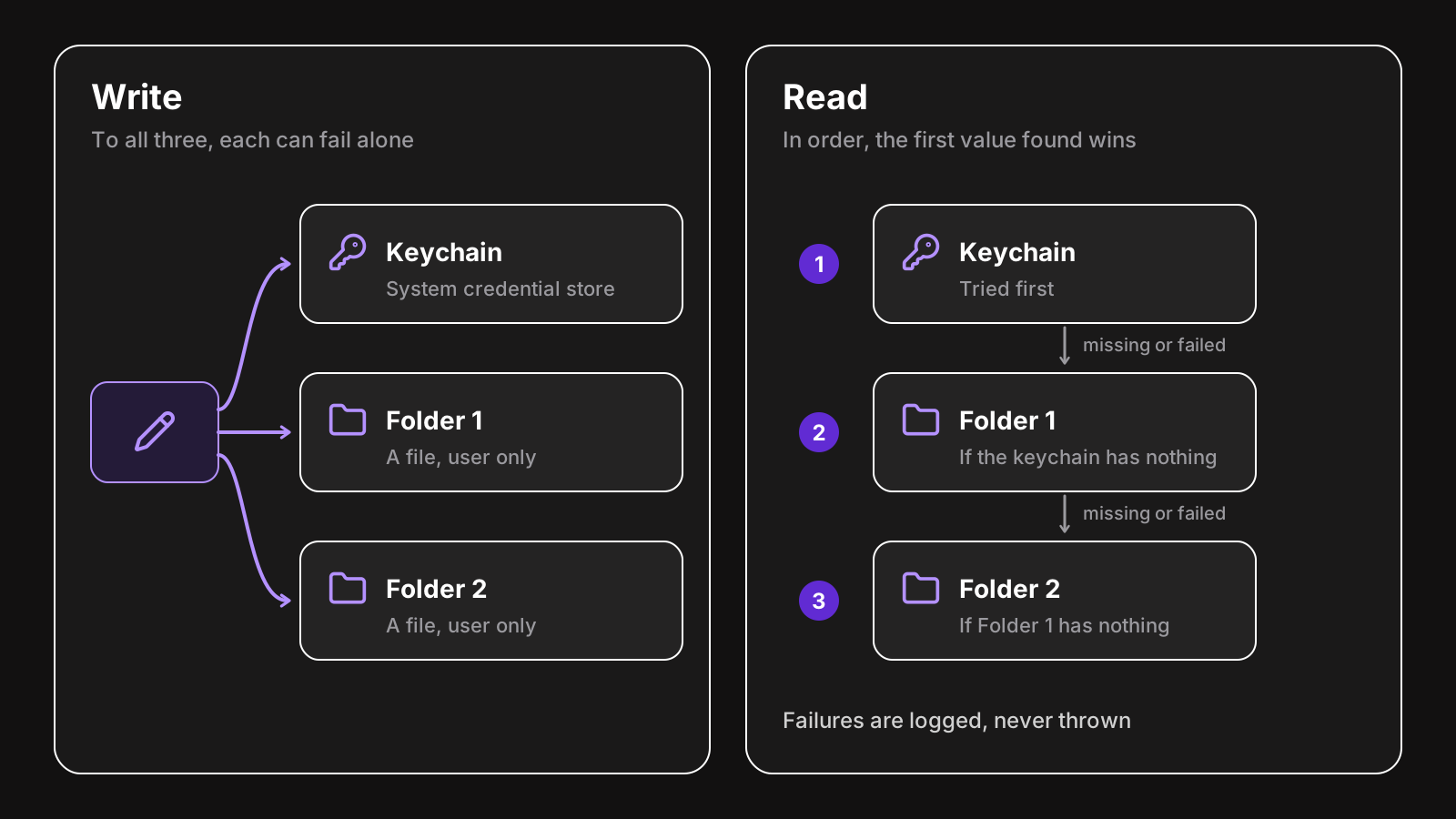
The keychain isn’t always there: Linux without a Secret Service, a corporate Windows with locked-down credentials, a broken keychain on macOS. An app that refuses to start in those cases loses a customer.
A robust approach writes to the keychain first, and also to files in a couple of folders, and reads from the first one that has the value. Storage failures are logged, never thrown. That’s what LicenseManager’s Electron SDK does with license keys and tokens: see stored data.
Wrapping up
keytar is gone, but its job isn’t. Use safeStorage for secrets that can be lost, @napi-rs/keyring for the ones that must survive reinstalls, and never trust localStorage or electron-store with anything sensitive.